A bug triage process decides what happens to a problem report after someone sends it: whether the team can reproduce it, how much it matters, who takes it and how anyone will know it's fixed. Without a shared map, those decisions can end up scattered across chat threads. Details from the first report get lost, and a ticket can close because code changed while nobody checks the thing the reporter saw.
This guide maps one bug from report to verified fix. You'll write a report someone can act on, decide what happens when the evidence runs out, separate severity from priority, name an owner and check the fix against the original report. The editable starter gives you the same flowchart and worksheet for your own bugs.
What triage has to decide
Chromium's triage guide describes triage as making decisions about the need, priority, timing and assignment of work requests. Those decisions depend on each other, which is why a flowchart helps. You can't judge priority until you know what's broken, and you can't confirm a fix unless you recorded what broken looked like.
The order matters too. The Kubernetes triage guidelines start a bug by trying to reproduce it, and only then define its priority and search for duplicates. Triage can run continuously or in a scheduled meeting. Firefox's guidance suggests senior people triage bugs as they arrive, with a weekly meeting for the ones that need discussion. The map works for either arrangement because it records the decisions, whoever makes them.
If you want a board for routing every incoming report, the bug triage flowchart template sorts them into more information, duplicate, hotfix, sprint or backlog, and includes a severity table. This guide goes deeper on a single bug, from the first report to the check that closes it.
If this is your first map of this kind, read how to make a flowchart people can actually follow for the shapes and the order to draw them in.
Capture a useful report
Imagine a fictional workshop booking site. Someone presses Book a place, sees a message saying something went wrong, tries again and gets through. Support passes this on. Your job as the product or engineering lead is to turn it into work the team can finish. The person booking only wants a place on Saturday's workshop.
Open the editable starter near the top of this page. It adds a fresh page alongside your existing drawings. Double-click a label to edit it, and start with the worksheet, because every later step reads from it.
Mozilla's bug writing guidelines treat the steps to reproduce as the most important part of a report, and warn that unclear steps can make it impossible to tell whether a bug has been fixed. They also ask for the expected and actual results, whether the bug happens at will, occasionally or not at all, and a clear split between what someone observed and what they suspect.
The first report in the example says only that booking failed and then worked. That fails the first decision on the map, so it goes to the reporter with three questions: when did it happen, in which browser, and how long had the page been open? The answer to the last one matters later. They'd left the page open while checking dates with a friend.
The worksheet also has a line for guesses. Support suspected the payment provider, and that stays in the Guesses line until someone shows it. Written in the Actual line, it would send the investigation the wrong way.
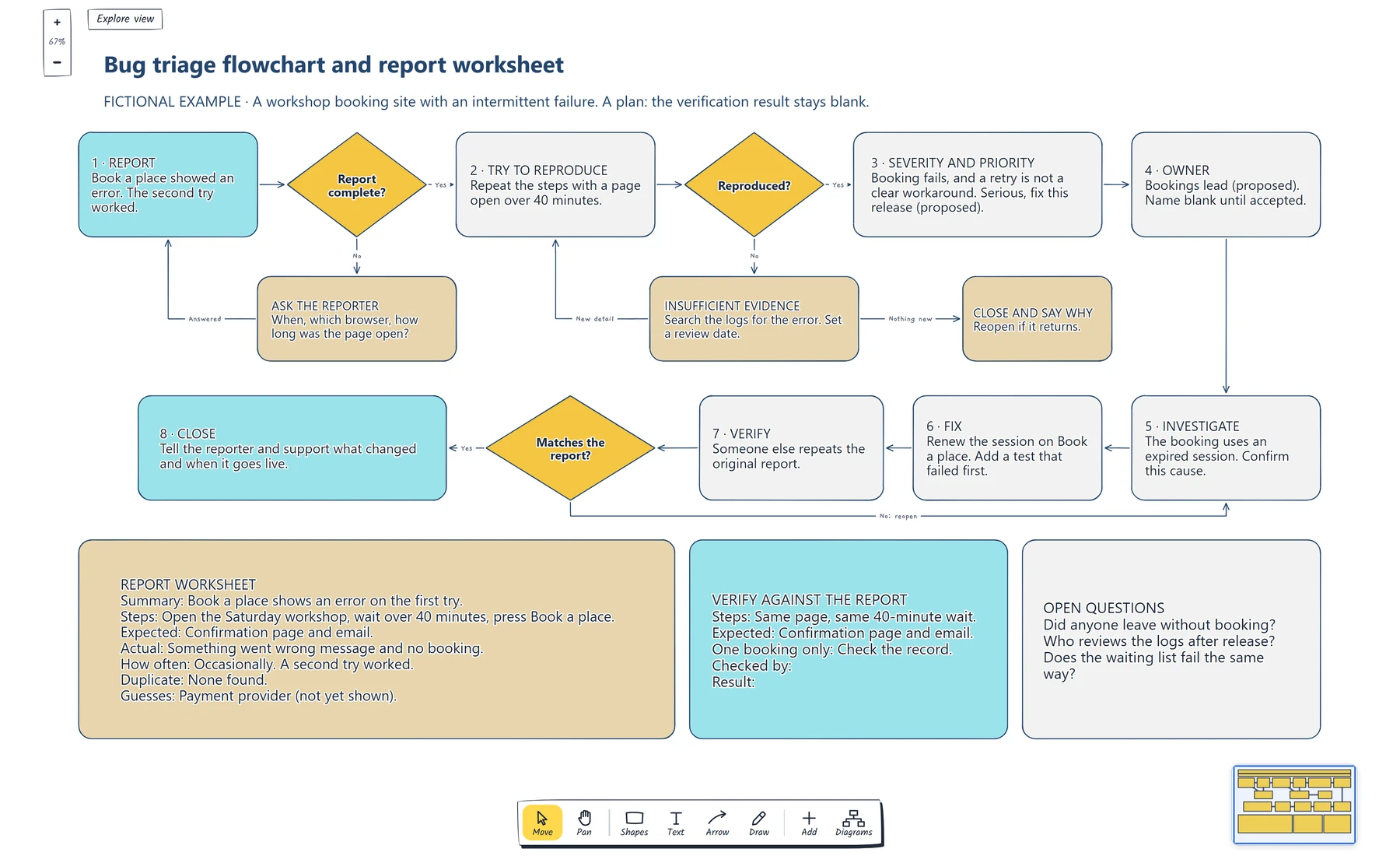
Follow the top row for the decisions, then the second row back from investigation to close. Check that each No has somewhere to go. The verification result stays blank because this is a plan.
Decide what happens when the evidence runs out
An intermittent bug can stall at the second decision. A tester books the same workshop on a fresh page several times and everything works. Without a rule, the ticket either closes too early or sits open indefinitely.
So the map gives "not reproduced" its own branch. In the example, the tester searches the logs for the same error and sets a review date. The search shows the failures came from pages that had been open for a long time, which matches the reporter's reply. That's new detail, so the route returns to reproduction with a changed condition: open the page, wait over 40 minutes, press Book a place. Now the first press fails. The second works, just as the report said.
A bug that looks random may have a condition nobody has written down yet. The loop makes the team look for it, and the review date stops the search running forever.
The other exit matters as much. Firefox's guidance says you don't have to wait forever for a reply, and open questions shouldn't linger for more than two weeks. Kubernetes closes an issue with a comment after 20 days of silence. Django's ticket triage docs use a needsinfo state, and the ticket reopens when more information arrives. Choose a period that suits your team, then write it on the card. If nothing new turns up by the review date, close the report, say why and reopen it if the problem returns.
Search for duplicates once you can describe the failure. Linking reports keeps the discussion in one place, and a second reporter may hold the detail you're missing.
Map severity and ownership
Severity and priority answer different questions, so keep them as two decisions on one card. Mozilla's field definitions treat severity as a bug's impact and an input to priority, which sets the order of work against other bugs. They also say people filing bugs shouldn't set severity, so a reporter's "urgent" counts as evidence and the triager still decides.
In the example, the retry is the awkward part. Mozilla's scale separates a serious bug with no satisfactory workaround from a normal one where a workaround exists. A second press does work, but the person has no way of knowing that, and the message gives them no reason to try. Booking is the site's main task, so the team proposes serious. Priority follows from that and from what else is planned: fix it this release.
Then ask one person to accept the bug. Firefox names triage owners for each component, and they make sure triage happens on time without having to do all of it themselves. The example shows a proposed role and leaves the name blank until someone agrees. Without that step, a card can sit under a team's name with nobody working on it.
The owner's first job is to confirm the cause. Here, the booking request uses a session that has expired, and the error page starts a new one, which explains why the second try works. Nothing points to the payment provider, so the guess comes off the worksheet.
If accepted bugs join your planned work, build a product Kanban board with clear handoffs to show who picks each one up next.
Verify the fix against the report
The fix renews the session when someone presses Book a place. Django's guide offers a useful habit for this step: its advice on tracking down a regression begins by writing a test and confirming it fails. A test that failed before the fix and passes after it shows the change affected this bug.
That test covers the code. The verification card covers what the reporter saw, and someone other than the person who made the fix should complete it. Mozilla's Bugzilla field guide describes the QA contact as the person who verifies a fix once the bug is resolved, and Bugzilla's documentation treats a confirmed fix as a further state after a fixed one. A small team may not have a QA role, but it can still have a second person.
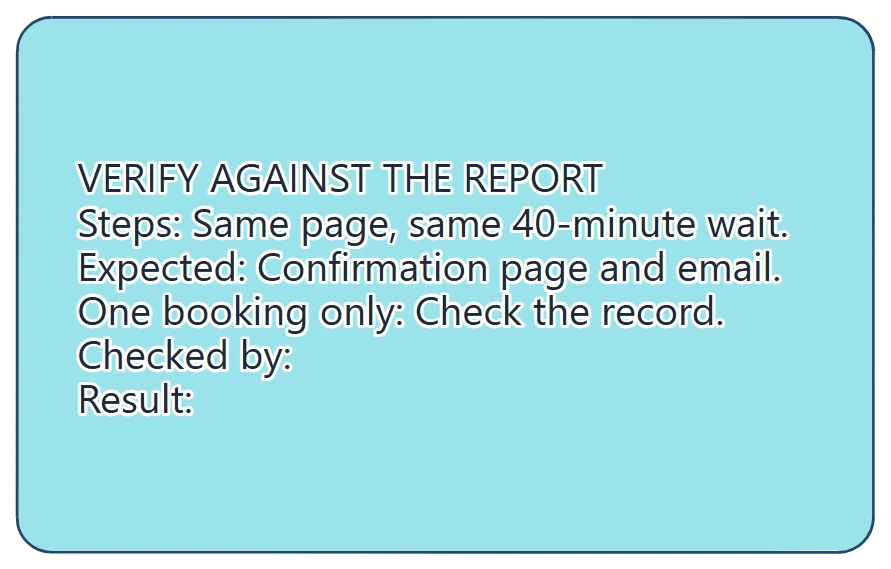
The card repeats the report's steps and expected result, so the check tests the failure someone saw. Checked by and result stay blank until the test runs.
Copy the steps and the expected result straight from the worksheet, including the 40-minute wait. Testing on a fresh page would pass even with no fix, because a fresh page never failed. Then add anything the change could have disturbed. A renewed session mustn't create a second booking, so the card asks someone to check the record.
If the result doesn't match, the route goes back to investigation, with what you learned added to the ticket. If it matches, closing has one more job: tell the reporter and support what changed and when it goes live. The bug can then feed the next release checklist, where a long-open page becomes a journey to test.
If similar bugs keep coming back after verified fixes, create a fishbone diagram of the possible causes and mark which ones someone has checked.
Review checklist
Copy this into your bug tracker or triage notes:
Summary of the problem:
Steps to reproduce, including conditions:
Expected result:
Actual result:
How often it happens:
Duplicate search:
Guesses still to prove:
Review date if not reproduced:
Severity and reason:
Priority and reason:
Owner who accepted it:
Confirmed cause:
Test that failed before the fix:
Verification steps, copied from the report:
Side effects checked:
Checked by, date and result:
Who told the reporter and support:
Before closing a bug, read its verification result beside the Actual line. If someone new to the bug can't see that the failure has gone, the ticket needs more detail.
Optional: create the example with an AI assistant
If you use an AI assistant that supports remote MCP with OAuth sign-in, you can ask it to build this flowchart in your EpicDraw workspace. MCP is the connection that lets the assistant use EpicDraw's diagram tools.
This route needs a free EpicDraw account and cloud sync, and only synced pages are available remotely. Open More, choose Connect AI assistant and add https://epicdraw.app/mcp in your assistant. When EpicDraw asks you to approve the connection, allow it to create and edit diagrams. The MCP connection guide walks through each step.
Paste this prompt into the connected assistant:
Using the connected EpicDraw MCP server, create a new editable page named "Bug triage flowchart and report worksheet". Leave existing pages unchanged.

Map bug triage for an intermittent fictional workshop booking failure. Include report, reproduction attempt, severity and priority decision, owner, investigation, fix, verification against the original report and closure. Add branches for an incomplete report and insufficient evidence, a filled report worksheet and a verification card with the checker and result left blank.

Use editable shapes, text and connectors. Label the example as fictional and mark unknowns as open questions. This is a visual planning draft. Check for overlapping objects and overflowing labels, then return a PNG preview and the private editor link. Leave the result as a draft for me to review.
Open the returned private editor link while signed in. The assistant's layout may differ from the screenshot, so check the decisions, owner and open questions before adapting it. The result is a planning board, and it doesn't reproduce a bug or show that a fix works.
Takeaways
- Record the steps, expected result, actual result and how often it happens, and keep guesses on a separate line.
- Give "not reproduced" its own branch with a review date, so an intermittent bug neither closes early nor sits open indefinitely.
- Decide severity from the impact and priority from the order of work, then ask one person to accept the bug.
- Add a test that failed before the fix, then have someone else repeat the original report under the same conditions.
- Close the bug by telling the reporter and support what changed.
Keep your next draft close
Create a free account to save your pages in the cloud and use them across devices.
Create a free accountYou can keep drawing without an account.