A product release checklist helps a team decide whether a change is ready for the people who will use it. Many checklists stop at the deployment: the tests passed, the migration ran, the new version is out. They say little about whether someone can still finish what they came to do, or who will notice if they can't.
This guide builds the checklist around user journeys. You'll list the journeys a release could break, assign evidence to each one, agree what happens if one fails and name who checks the first hours afterwards. The editable starter gives you the same structure for your own release.
Why start with journeys
A user journey is a task someone completes from start to finish, including the route they take when something goes wrong. "The email service is deployed" describes the system. "A new person can verify their account" describes something a person needs, and it can fail while every deployment step looks green.
Google's SRE book on launches describes checklists as a way to reduce failure and keep launches consistent and complete. It also says each question should be justified, ideally by a past launch problem. Keep your list to the journeys this release affects, and give every line a reason to be there.
List the journeys the release could break
Imagine a fictional course-booking site adding registration with email verification. Your job as the product manager is to agree when the release is ready. The person registering needs an account they can get back into later.
Start with the route the team has been building, then ask what else that person might run into and which existing journeys depend on the change. For this release, that gives five:
- Sign up, ending at a screen telling the person to check their email.
- Invalid details, where the form rejects something and the person corrects it.
- Verification, where the email arrives and the link works.
- Expired-link recovery, for someone who opens the email a day later.
- Return to sign in, including people who already had an account.
The second and fourth are shaded in the example because they're recovery routes, and they're easy to leave out of a list written around the deployment.
Open the editable starter near the top of this page. It adds a fresh page alongside your existing drawings. Double-click a label to edit it, and write one journey in each row. Put the expected result beside the journey name, because that sentence is what the evidence will have to show.
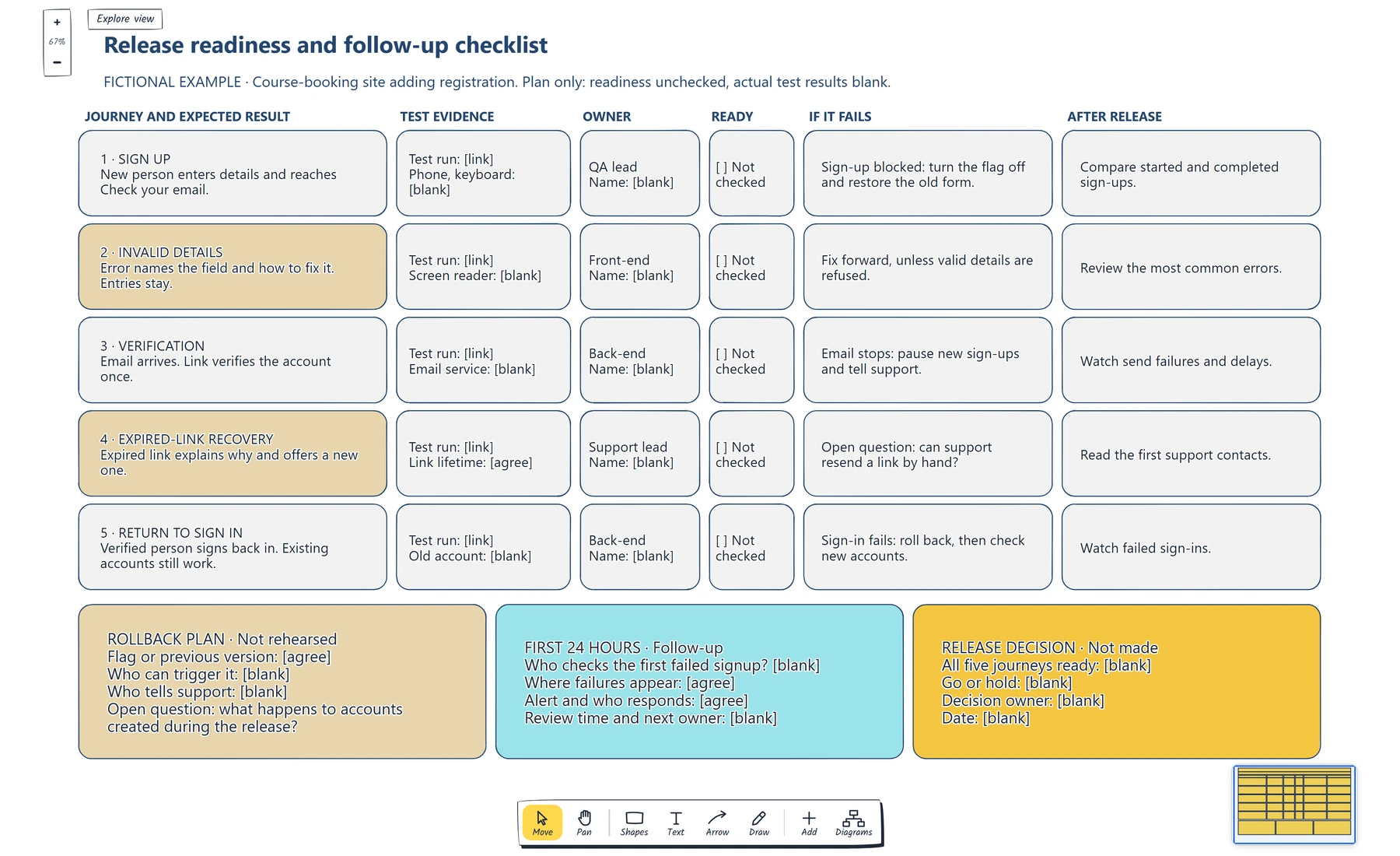
Read across one row to see what ready means for that journey, then check the three cards below. The readiness boxes are unticked and test results are blank because this is a plan.
If you have not drawn these routes yet, start with how to map a signup flow. The checklist can only cover branches someone has noticed.
Assign evidence to each journey
Now ask what would convince you that each journey works. "QA has tested it" gives a reviewer nothing to check. A link to a test run is something they can open.
Each row in the example needs a test run plus one check specific to that journey. Sign up needs a pass on a phone and with a keyboard. Verification depends on another system, so it names the email service. The GOV.UK Service Manual's guidance on deploying software makes the same point about smoke tests, the quick checks you run after deploying: they should exercise the software and all its essential dependencies. A registration test that fakes the email step could pass on a day when nobody can verify an account.
The expected result can carry its own requirement. For invalid details, the example says the error names the field and how to fix it. That follows WCAG, the web accessibility standard: when an input error is detected automatically, the item in error must be identified and the error described in text. A suggested correction should be offered when one is known, unless that would harm security or the purpose of the content.
Then give each row one owner: the person who brings the evidence and says whether it's enough. The example shows a proposed role and leaves the name blank until someone has accepted it. Tick the readiness box only when the evidence exists.
Decide what happens if a journey fails
Agree the response for each journey before release, while nobody is under pressure. The response differs by row, which is why it sits there instead of in one general note.
In the example, a blocked signup means turning the feature flag off and restoring the old form. A confusing error message can probably be fixed forward, unless the form is refusing valid details. If verification emails stop, the team pauses new signups and warns support. Write down the symptom you'd see and the action you'd take for your own release.
The GOV.UK guidance says that if a release isn't working you can cancel it or roll back, and Google describes feature flags that let each change be reverted on its own. Either route only helps if it exists and someone is allowed to use it. The rollback card asks how you'd reverse the change, who can trigger that and who tells support.
It also holds an open question that a code rollback can't answer: what happens to accounts created during the release? Restoring the old version doesn't remove those people, so someone needs to decide how they get in. Leave the question on the board until it has an answer.
Name who checks the first failure
Real use starts once the release is live. The after-release column says what to watch for each journey, and the follow-up card says who does the watching.
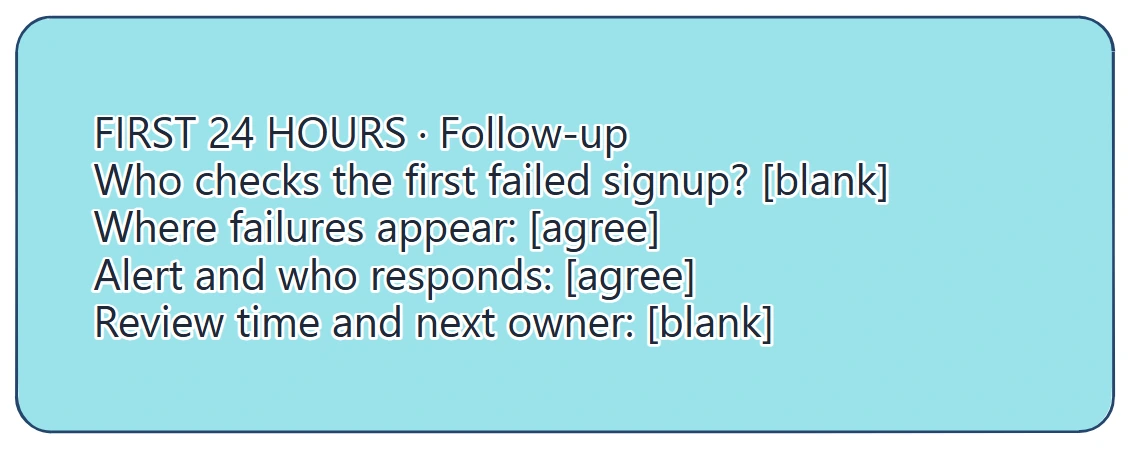
The follow-up card turns a general intention to monitor into named work. Check that each line has an agreed answer before release.
Start with one blunt question: who checks the first failed signup? Then agree where failures appear, because that person needs somewhere to look. GOV.UK's monitoring guidance recommends tracking user measures such as task completion alongside technical ones, keeping alerts clear and easy to act on, and logging errors in a ticketing system so they can be assigned.
For registration, that could mean comparing started and completed signups, watching email send failures and reading the first support contacts. Someone stuck on an expired link may contact support first, which is why the support lead owns that row.
Finish with a review time and a next owner. Bring back what happened, and turn any gap into a line for the next release.
When that first failure turns into a bug report, follow how to map a bug triage process to take it from report to verified fix.
Make the go or hold decision
With the rows and cards filled in, the release decision is short. Are all the journeys ready? If one isn't, does someone accept that risk, or do you hold? The decision card records the answer, who made it and the date.
For a staged rollout, Google describes starting with a small group and expanding gradually. The same rows work there: add a check and an owner for each stage.
Review checklist
Copy this into your release notes:
Release and date:
Journeys affected, including recovery routes:
Expected result for each journey:
Test evidence and essential dependencies:
Owner for each journey:
Response if each journey fails:
Rollback route, who can trigger it and who tells support:
Open questions about data created during the release:
What to watch after release, and where:
Who checks the first failure:
Go or hold, decision owner and date:
Review time, findings and next owner:
Before the release meeting, ask someone outside the team to read one row and say what they'd do if that journey failed tonight. If they can't, the row needs more detail.
Optional: create the example with an AI assistant
If you use an AI assistant that supports remote MCP with OAuth sign-in, you can ask it to build this checklist in your EpicDraw workspace. MCP is the connection that lets the assistant use EpicDraw's diagram tools.
This route needs a free EpicDraw account and cloud sync, and only synced pages are available remotely. Open More, choose Connect AI assistant and add https://epicdraw.app/mcp in your assistant. When EpicDraw asks you to approve the connection, allow it to create and edit diagrams. The MCP connection guide walks through each step.
Paste this prompt into the connected assistant:
Using the connected EpicDraw MCP server, create a new editable page named "Release readiness and follow-up checklist". Leave existing pages unchanged.

Create a release-readiness checklist for a fictional registration feature. Include signup, invalid details, verification, expired-link recovery and return-to-sign-in journeys. Add test evidence, owner, readiness, rollback and follow-up fields. Leave readiness unchecked and actual test results blank.

Use editable shapes, text and connectors. Label the example as fictional and mark unknowns as open questions. This is a visual planning draft. Check for overlapping objects and overflowing labels, then return a PNG preview and the private editor link. Leave the result as a draft for me to review.
Open the returned private editor link while signed in. The assistant's layout may differ from the screenshot, so check the journeys, owners and open questions before adapting it. The result is a planning board, and it doesn't test your release or show that anything is ready.
Takeaways
- Build the checklist from user journeys, including recovery routes such as an expired link.
- Ask for evidence someone can open, and include the dependencies each journey relies on.
- Agree the response to a failure for each journey before release, including what happens to data already created.
- Name who checks the first failure, where it will appear and when the team reviews what happened.
- Add a line to the next checklist for each gap the release exposed.
Keep your next draft close
Create a free account to save your pages in the cloud and use them across devices.
Create a free accountYou can keep drawing without an account.