
A product Kanban board helps a small team see what is ready to start, what is waiting and what has actually finished. Start by naming the states your work passes through. Then write what must be true before a card enters or leaves each state, and who will take the next action.
That gives a board review a practical question: “What is stopping this item from moving, and what will we do about it?” This guide builds a product Kanban board example with clear handoffs, a blocked-work record and an editable starter.
Make the columns describe work
A column should tell the team something about the work. “Doing” might include research, implementation or testing, depending on your process. A person's name tells you who is involved but leaves the state unclear.
Atlassian's Kanban board guide describes cards, workflow columns and work-in-progress limits. It also recommends starting from the process people actually use. Use that as your starting point: follow one recent item through the work before choosing the columns.
Keep discovery visible when it is part of that item. If an unanswered research question needs its own investigation, give that investigation a bounded card and a useful expected output. Avoid making a feature look ready for delivery while its underlying decision is still open.
Agree where work starts and finishes
For the walkthrough, imagine a fictional small booking team. Its visitor needs to choose a suitable time and identify the confirmed booking after a change. Your job is to make the team's progress and next handoff understandable.
The example uses Ready, Doing, Review and Done. Ready contains work available for discussion or selection. Work counts as started when someone pulls it into Doing, and stays started while in Review. For this board, Done means the change is released and its agreed checks are recorded.
| State | What the team should be able to explain |
|---|---|
| Ready | What is the bounded task, and what needs agreeing before it starts? |
| Doing | Who owns the next action, and what will be ready for review? |
| Review | What check or acceptance is still outstanding? |
| Done | Where are the agreed check and release records? |
Here, discovery happens within the delivery items. If you add a standalone research card, agree delivery of accepted findings as its finish condition. Completing that card does not mean the related feature has shipped.
These boundaries are choices for this example. If your team finishes at an accepted design handoff, name that boundary and its evidence. If release is a separate stage, add it. A reviewer should be able to tell whether “Done” means designed, implemented or available to the intended users.
Open the editable starter near the top of this page. It adds a fresh page alongside your existing drawings. Double-click a label to edit it. Replace the task and delivery boundary before adapting the columns, so the end of the board matches the job you are tracking.
If the intended change or delivery commitment is still unclear, use the outcome-based roadmap guide to agree the purpose before tracking work towards it.
Write the conditions for the next handoff
With the boundary agreed, work backwards from what the receiving person needs. “Ready for review” becomes useful when it identifies the work to inspect, the check to apply and the unresolved questions.
Use this policy sheet as a starting point:
| State | Entry condition | Exit condition |
|---|---|---|
| Ready | A bounded task and user need are written down. | Next action, accepted owner, review check and dependencies are clear enough to start; capacity is available. |
| Doing | Ready's exit conditions are met. | Reviewable work and check evidence are available, and review has been requested. |
| Review | The work, evidence and intended check are available. | Agreed checks are met, the handoff is accepted and release evidence is recorded. |
| Done | The board's agreed release and acceptance conditions are met. | Archive the item, or reopen it with a reason and next action. |
Treat these as team agreements to refine. A research card might need findings and their limits; a delivery card might need implementation and test evidence. Write the relevant check on the card so the same column can hold both without implying that a research finding is a shipped feature.
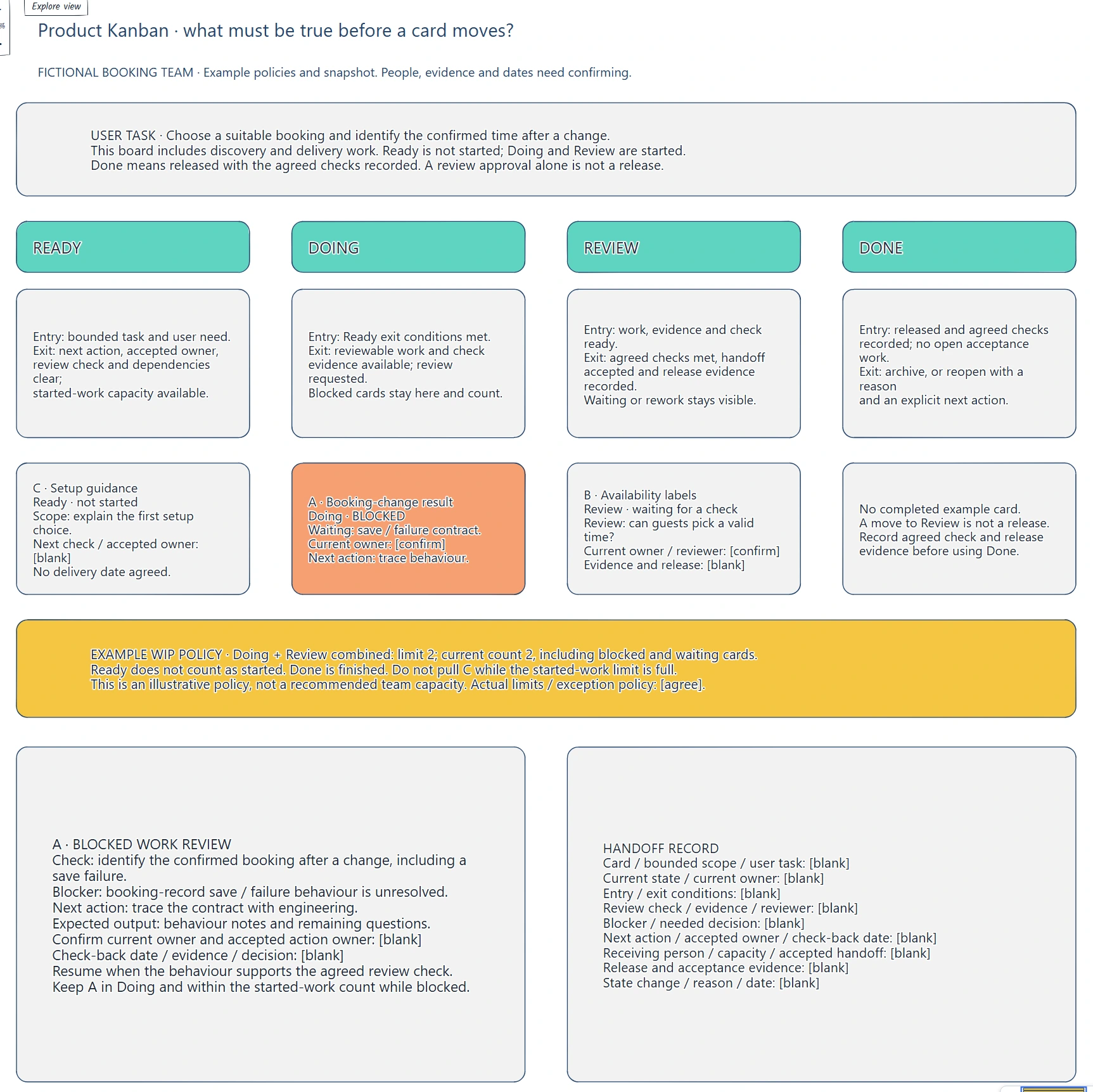
The column policies explain the next handoff. The example cards expose missing ownership and evidence that a board review needs to resolve.
For the booking-change card, the review question is whether the guest can identify the confirmed booking, including after a save failure. That question tells engineering which behaviour needs clarifying and tells the reviewer what to inspect later.
Before moving the card, ask the receiving person to accept the handoff and check their capacity. Moving a shape in EpicDraw records your decision; it does not notify an assignee, enforce the policy or perform the underlying work.
Keep waiting work inside the limit
Work in progress, or WIP, is work that has started and has not reached your finishing boundary. Waiting for review and being blocked do not make a started item disappear.
Atlassian's WIP guidance explains limits on work in a workflow state and recommends agreeing and reviewing those limits as a team. In this example, the team uses a combined limit across Doing and Review so it can see the whole started workload.
The illustrative limit is two cards. A is in Doing and blocked; B is in Review waiting for a check. Both count, so the combined count is two. C remains in Ready. Pulling C would exceed the example limit.
Two is a teaching value, not a recommended capacity for your team. Agree limits from your workflow and available skills, including how you handle exceptions. When the limit is full, inspect the existing work and what would help it finish before starting another item. Keep any agreed exception visible and review why it happened.
Review a blocker with a next action
Card A is waiting for an explanation of booking-record save and failure behaviour. Moving it to a separate uncounted “Blocked” area would hide part of the started workload. Keep it in Doing with a visible blocker, or make any separate blocked state count under your WIP policy.
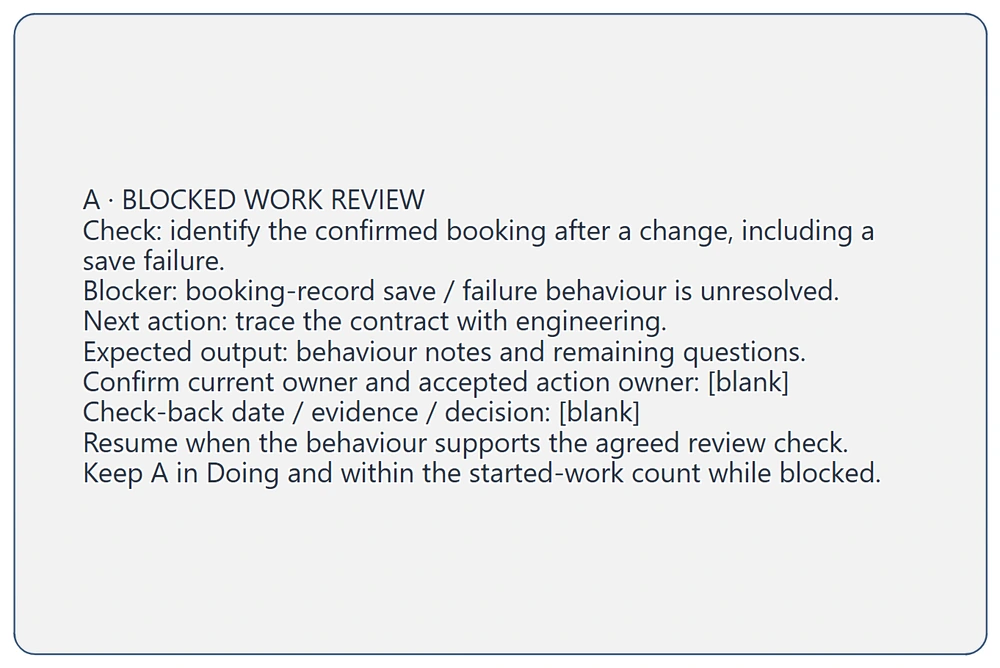
The blocker needs a decision and an accepted next action. Keep the card in the started-work count while that action is outstanding.
The proposed action is to trace the contract with engineering and bring back behaviour notes and remaining questions. Confirm who owns the card, who accepts that action and when they will check back. The example deliberately leaves those assignments open so the board review has something concrete to repair.
An engineering explanation can resolve a system question. Evidence about whether a guest understands the result needs the relevant review or research check too. Keep those outputs distinguishable.
For B, ask who will apply the availability check and where the result will be recorded. Leave it in Review until the agreed conditions are met. If it needs rework, record the reason and return it to Doing under the same started-work policy. If it is approved but awaiting release, keep that waiting state visible.
Bring the decision back to the card
Copy this handoff record:
Card and bounded scope:
User task and intended check:
Current state and current owner:
Entry and exit conditions:
Review evidence and reviewer:
Blocker or decision needed:
Next action and expected output:
Accepted action owner and check-back date:
Receiving person, capacity and accepted handoff:
Release and acceptance evidence:
State change, reason and date:
After the investigation, update the card with the evidence and decision. If the contract changes the scope, revise the review check before passing it on. Keep the reason for the change so a teammate can follow the handoff later.
If the same handoff problem keeps returning, use the retrospective action guide to examine the pattern and agree a change with an owner and a follow-up check.
Review checklist
- Do the columns match the work people actually do?
- Are the start and finish boundaries explicit?
- Can someone explain the evidence needed for each move?
- Does every started item have a confirmed current owner?
- Do blocked and waiting items remain visible in the WIP count?
- Has the receiving person accepted the handoff?
- Does Done contain the agreed acceptance and release evidence?
Takeaways
Clear handoffs come from agreed conditions and visible next actions. Name what the receiving person needs, keep ownership attached to the work and record why a card moves.
Review the started workload as a whole. A blocked card and a waiting review still need attention; keep their next action and check-back point on the board.
Optional: create the example with MCP
MCP lets a compatible assistant use EpicDraw's tools to create an editable board. You need a free EpicDraw account, cloud sync and an assistant supporting remote MCP with OAuth sign-in. Only cloud-synced pages are available remotely.
Follow the MCP connection guide, add https://epicdraw.app/mcp in your assistant and allow it to create and edit diagrams.
Use this prompt for the worked example:
Using the connected EpicDraw MCP server, create a new editable page named "Product Kanban and handoff checks". Leave existing pages unchanged.

Create a fictional small booking-team board. User task: choose a suitable booking and identify the confirmed time after a change. Include discovery and delivery work. Ready means not started; Doing and Review mean started. Done means released with agreed checks recorded; review approval alone is not release.

Use four columns with these policies. Ready: enter with a bounded task and user need; leave when the next action, accepted owner, review check and dependencies are clear enough to start and started-work capacity is available. Doing: enter when Ready exit conditions are met; leave with reviewable work, check evidence and review requested. Blocked cards stay here and count. Review: enter with work, evidence and check available; leave when agreed checks are met, the handoff is accepted and release evidence is recorded. Waiting and rework stay visible. Done: enter after release and agreed checks are recorded; archive or reopen with a reason and next action.

Place C, setup guidance, in Ready: explain the first setup choice; next check and accepted owner blank; no delivery date agreed. Place A, booking-change result, in Doing and mark BLOCKED: waiting for save/failure contract; current owner to confirm; next action trace behaviour. Place B, availability labels, in Review waiting for a check: can guests pick a valid time? Current owner and reviewer to confirm; evidence and release blank. Put no completed example card in Done.

Show an illustrative combined WIP limit of 2 across Doing and Review. Current count 2 includes blocked A and waiting B. Ready C is not started; do not pull it while the limit is full. State that 2 is an example policy, not a recommended capacity; actual limits and exception policy need agreement.

Add a detailed A blocked-work review: check whether the confirmed booking is identifiable after a change, including save failure; unresolved booking-record save/failure behaviour; trace the contract with engineering; return behaviour notes and remaining questions. Leave current/accepted action owner, check-back date, evidence and decision blank. Resume when behaviour supports the agreed review check. Keep A in Doing and within the started-work count while blocked.

Add a reusable blank handoff record for scope/user task, current state/owner, entry/exit conditions, review check/evidence/reviewer, blocker/decision, next action/accepted owner/date, receiving person/capacity/accepted handoff, release evidence and state-change reason/date.

Use editable shapes and text, label the snapshot and policies fictional, and leave actual people, evidence and dates unconfirmed. Check overlaps and overflowing labels, then return a PNG preview and private editor link. This is a planning draft; do not assign real work, enforce limits or create a booking application.
Inspect the returned PNG and open the private editor link while signed in. Layouts vary by assistant, so check the policies, WIP count, missing assignments and evidence fields. The result is an editable planning draft; it does not assign work, enforce limits or create a working booking service.
Keep your next draft close
Create a free account to save your pages in the cloud and use them across devices.
Create a free accountYou can keep drawing without an account.