
A product experiment plan connects an interface change to a question the team can answer. Before building the variant, write what you expect to change, who the test includes and what result would affect your decision. Then agree the comparison, measures and conditions for stopping.
This guide turns those choices into an editable experiment canvas. It helps a product team discuss the plan with research, engineering and analysis before exposing a change to customers.
Choose the question before the test
Start with the uncertainty behind the proposed change. Are people missing information? Can they understand it once they find it? Would changing its position affect completed orders? These questions need different evidence.
A usability session can help you examine whether someone finds and understands information in a sketch. A live A/B test compares outcomes between randomly assigned groups seeing a control and a variant. A preference for one sketch does not establish an effect on orders.
HMRC's account of A/B testing explains why a simple before-and-after comparison can be misleading: other circumstances may change too. Its teams connect evidence about a problem to a hypothesis and a measure of success.
If the problem itself is unclear, investigate that first. Put the evidence and its limits on the canvas so the proposed solution has something to answer.
If several proposed changes compete for attention, use the feature prioritisation guide to compare their reasons and identify the uncertainty worth investigating next.
Write a hypothesis someone could challenge
For the walkthrough, imagine a fictional shop considering where to show delivery information on a product page. The shopper needs enough information to judge a purchase. Your job is to plan how the team will evaluate a placement change.
The example starts with an assumption: shoppers miss delivery information below the product details. It contains no actual research, baseline or results. Add your own permitted evidence before treating that assumption as an observed problem.
The proposed hypothesis is:
Moving the same accurate delivery summary beside Add to basket will increase the share of eligible assigned visitors who complete a paid order within an agreed follow-up window.
That identifies a change and an outcome you can examine. Keep the suggested explanation beside it: easier access to delivery information might affect the purchase decision. Order completion alone will not show whether someone understood the terms; use a separate research check for that question.
Make the comparison specific
With the hypothesis written, define what each group would see. The control keeps the delivery summary below the product details. The proposed variant moves that same summary beside Add to basket.
Keep the summary's wording, product, price, stock, delivery policy and other interface content consistent. If you also rewrite the terms or introduce a discount, the comparison will no longer isolate placement. Record any unavoidable differences before deciding what the result could mean.
Open the editable starter near the top of this page. It adds a fresh page alongside your existing drawings. Double-click a label to edit it. Replace the experiment question and the control and variant descriptions first.
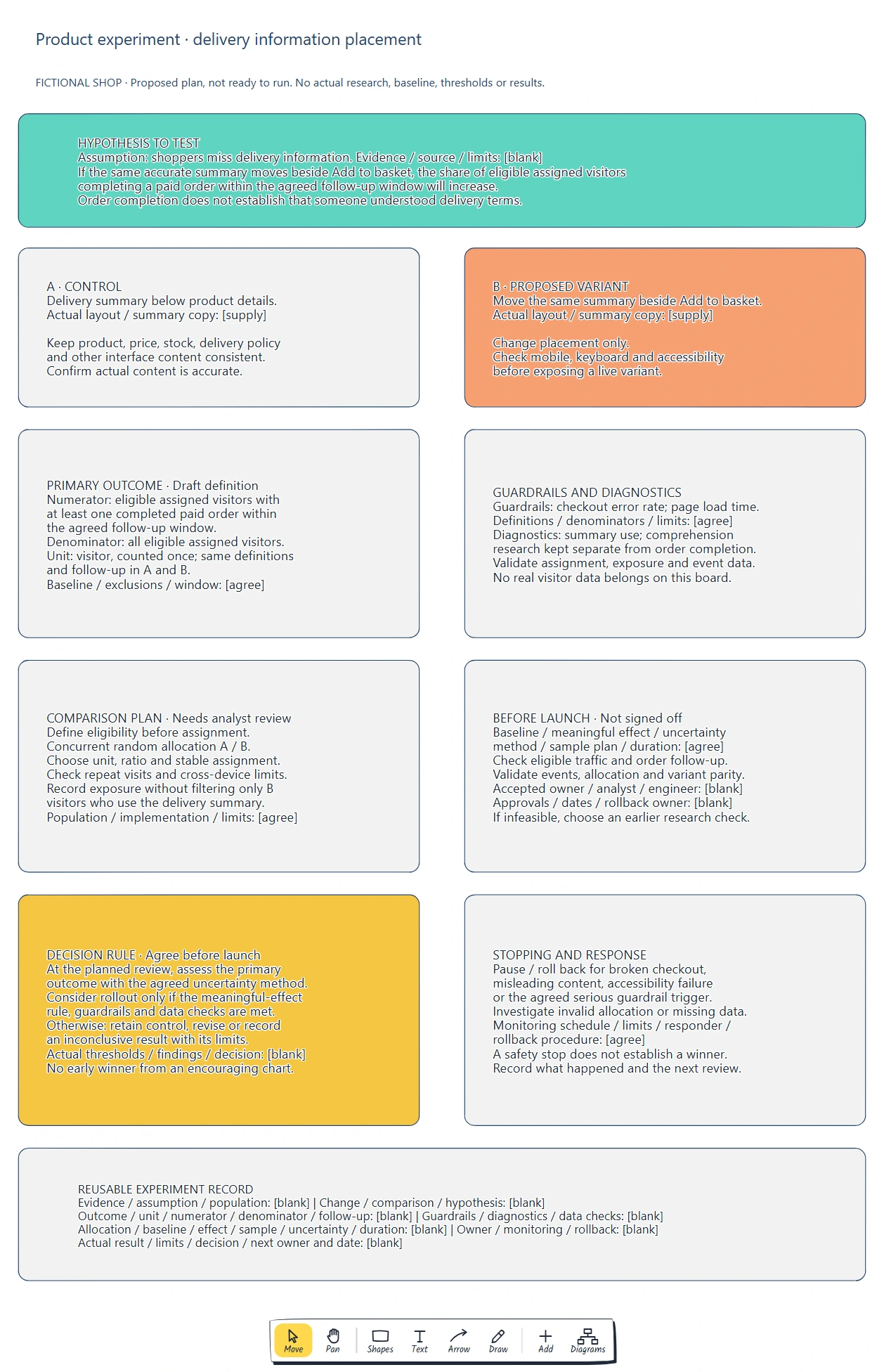
Read the canvas from the hypothesis through the comparison and measures. The blank evidence, thresholds and approvals identify what the team still needs to agree.
The canvas records the plan. Engineering still needs to implement and test the actual variants, including mobile layout, keyboard use and accessibility.
Define what you will count
Now turn the expected outcome into a measure both groups can use. The example proposes a visitor-level paid-order completion rate:
| Part | Draft definition |
|---|---|
| Numerator | Eligible assigned visitors with at least one completed paid order within the agreed follow-up window. |
| Denominator | All eligible assigned visitors, counted once. |
| Follow-up | The same agreed period after assignment in both groups. |
| Details to confirm | Eligibility, exclusions, the meaning of completed paid order and the measurement implementation. |
Define eligibility before assignment. Do not compare only variant visitors who clicked the delivery summary with everyone in the control; using the summary may itself be affected by the change. Ask the analyst to review the population and exposure rules.
Add measures for possible harm. The example names checkout error rate and page load time as guardrails, with definitions and limits still to agree. A diagnostic measure such as use of the summary may help explain behaviour, but it should not quietly replace the primary outcome after results arrive.
Microsoft's guidance on experiment measurement distinguishes data-quality checks, diagnostic measures and guardrails. Keep those roles visible on the canvas so an encouraging local measure cannot hide a broken journey.
Check whether the experiment can answer the question
The comparison needs a practical assignment and measurement plan. Ask engineering and analysis to define the randomization unit, allocation ratio and consistent assignment across visits. Record cross-device and repeat-visit limitations that affect interpretation.
Before launch, agree a baseline, the smallest effect worth acting on, an uncertainty method, a sample plan and duration. Include enough follow-up for the order outcome to be observed. Microsoft's pre-experiment guidance explains that statistical power and the affected population matter when planning traffic.
The template supplies no universal sample size or test length. If available traffic cannot support the proposed comparison, reduce the uncertainty with an earlier research check or reconsider the test. Filling a calendar slot will not make the result informative.
Validate assignment, exposure and outcome events before relying on them. Check that both variants can be measured consistently, and agree how to detect missing data or an unexpected allocation imbalance. Use approved measurement practices and respect people's choices; keep real visitor records out of the planning board.
Name the accepted owner, analyst and engineering contact. Record the launch approvals and actual dates after agreement. Until these fields and checks are resolved, the example remains a proposed plan.
Agree the decision and stopping rules
Write the decision rule while results are still unknown. At the planned review, assess the primary outcome using the agreed uncertainty method and meaningful-effect rule, alongside guardrails and data checks. Specify what would justify considering a rollout, retaining the control or revising the idea.
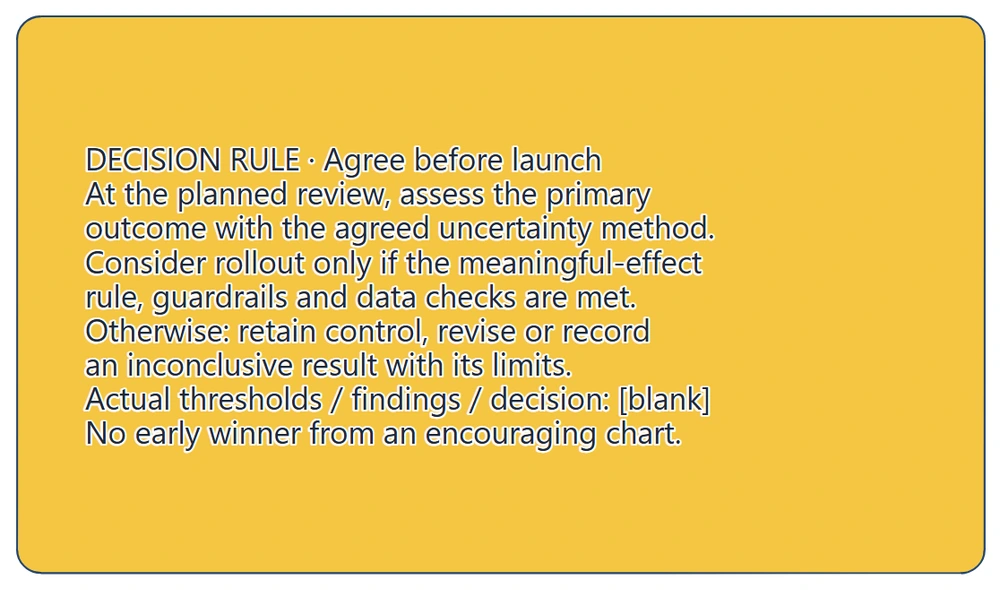
The rule belongs in the plan before launch. An inconclusive result remains a valid outcome to record; the blank fields are not permission to choose thresholds later.
Separate safety monitoring from declaring a winner. The example calls for pausing or rolling back for broken checkout, misleading content, accessibility failure or an agreed serious guardrail trigger. Assign a responder and a rollback procedure. Invalid allocation or missing data needs investigation before interpreting the comparison.
Microsoft also cautions that repeated early checks need appropriate statistical treatment. An encouraging chart is not a reason to end the test outside its agreed analysis plan. A safety stop protects customers; it does not establish which variant won.
At review, record the actual result and its uncertainty, data limitations, the decision and who owns the next step. If the evidence cannot distinguish useful improvement from no useful improvement, state that limit. Do not turn an inconclusive result into a claim that the layouts are equivalent.
Review checklist
Copy this product experiment template into your planning notes:
Problem, evidence and limits:
Assumption and hypothesis:
Eligible population and assignment unit:
Control, variant and consistent conditions:
Primary outcome, numerator, denominator and follow-up:
Guardrails, diagnostics and data-quality checks:
Baseline, meaningful effect, sample and uncertainty method:
Duration and planned review:
Safety triggers, monitoring, responder and rollback:
Accepted owner, collaborators and launch approvals:
Actual findings, uncertainty and limitations:
Decision, next action, owner and date:
Before implementation, check that the comparison answers the question, both groups have the same measure definitions, and the test is feasible. Before launch, confirm the variants and measurement work, the decision rule is agreed and someone can respond to a problem.
Takeaways
Start with the uncertainty and choose evidence that can address it. Connect the proposed interface change to a specific comparison and a defined outcome, with guardrails for the rest of the journey.
Agree feasibility, interpretation and stopping conditions before launch. Bring the actual findings and their limits back to the decision, including when the experiment remains inconclusive.
Optional: create the example with MCP
MCP lets a compatible assistant use EpicDraw's tools to create an editable experiment canvas. You need a free EpicDraw account, cloud sync and an assistant supporting remote MCP with OAuth sign-in. Only cloud-synced pages are available remotely.
Follow the MCP connection guide, add https://epicdraw.app/mcp in your assistant and allow it to create and edit diagrams.
Use this prompt for the worked example:
Using the connected EpicDraw MCP server, create a new editable page named "Product experiment plan · delivery information". Leave existing pages unchanged.

Create a fictional shop experiment canvas marked Proposed plan / Not ready to run. Assumption: shoppers miss delivery information; leave actual research, evidence, baselines, numerical thresholds and results blank. Hypothesis: moving the same accurate delivery summary beside Add to basket will increase the share of eligible assigned visitors who complete a paid order within an agreed follow-up window. State that paid orders do not establish understanding of delivery terms.

Show A, the control: summary below product details. Show B, the proposed variant: move the same summary beside Add to basket. Leave actual layout and copy to supply. Keep product, price, stock, delivery policy and other interface content consistent. Check mobile, keyboard and accessibility before exposure.

Add the primary outcome definition: numerator is eligible assigned visitors with at least one completed paid order within the agreed follow-up; denominator is all eligible assigned visitors; visitor unit counted once, with the same definitions and follow-up in both groups. Eligibility, exclusions, baseline and window need agreement. Add checkout error rate and page load time as guardrails, with definitions, denominators and limits to agree. Keep summary-use diagnostics and comprehension research separate from order completion. Validate assignment, exposure and event data; include no real visitor records.

Add the comparison plan: define eligibility before assignment, concurrent random allocation A/B, unit, ratio and stable assignment to agree, repeat-visit and cross-device limits to check. Do not filter the comparison to variant visitors who use the summary. Add launch requirements: analyst review of baseline, meaningful effect, uncertainty method, sample plan, duration, eligible traffic and outcome follow-up; validate events, allocation and variant parity. Leave accepted owner, analyst, engineer, approvals and dates blank. If infeasible, choose an earlier research check.

Add a decision rule to agree before launch: review the primary outcome with the agreed uncertainty method; consider rollout only if the meaningful-effect rule, guardrails and data checks are met; otherwise retain control, revise or record an inconclusive result with limits. Leave actual thresholds, findings and decision blank. Do not declare an early winner from an encouraging chart.

Add stopping and response: pause or roll back for broken checkout, misleading content, accessibility failure or the agreed serious guardrail trigger; investigate invalid allocation or missing data. Monitoring, limits, responder and rollback procedure need agreement. A safety stop does not establish a winner. Add a reusable blank experiment record for evidence, population, hypothesis, comparison, measures, allocation, feasibility, decision rules, monitoring, ownership, actual results, limits and next action/date.

Use editable shapes and text, label the scenario fictional and separate proposals from actual evidence and agreement. Check overlaps and overflowing labels, then return a PNG preview and private editor link. Leave a planning draft; do not implement variants, collect data or run an experiment.
Inspect the PNG and open the private editor link while signed in. Assistant layouts vary, so check the hypothesis, measure definitions, unknowns and stopping rules. Creating the canvas does not implement the variants, collect evidence or run an experiment.
Keep your next draft close
Create a free account to save your pages in the cloud and use them across devices.
Create a free accountYou can keep drawing without an account.