
A feature prioritisation board helps a team explain why one improvement should come before another. Give each candidate the same questions about the user problem, supporting evidence and delivery work. Then keep the decision, its trade-off and the reason to revisit it beside the candidate.
You can start with a small set of ideas and the information you already have. Visible gaps give the team something to investigate before an attractive feature name turns into a release commitment. The editable board in this guide includes a worked example and a blank feature prioritisation template.
What belongs on a prioritisation board
Use one card or column for each candidate. Keep enough detail to compare the proposals at a consistent scope:
- The user problem and the change being considered.
- The criteria you will use, with evidence and open questions.
- The delivery work, dependencies and constraints to check.
- A decision record with a reason, owner and condition for review.
Start by agreeing what the work is meant to achieve. “Improve bookings” leaves too much open: a feature for finding a time and a feature for changing an existing booking address different parts of the journey.
NN/g's prioritisation guidance recommends deriving criteria from the project's goals and defining the scale before comparing items. Apply that discipline to the board. A written comparison is enough to begin; add scores only when the team can explain the scale and the evidence behind each value.
Give the candidates a shared outcome
For the walkthrough, imagine a fictional booking product planning a release. The person's task is to keep a booking they can attend and know which time is confirmed. Your job as the product manager is to compare proposed improvements to that journey and make the next decision traceable.
The team has three illustrative candidates:
| ID | Candidate | Scope for this comparison |
|---|---|---|
| A | Rescheduling | Change the time of an existing booking and show the result. |
| B | Clearer availability | Explain which times can be selected. |
| C | Booking reminders | Explore a single reminder about a confirmed booking. |
There are no actual research findings, estimates or agreed release priorities behind the example. Its proposed next check shows how to handle missing information.
Write the outcome above the candidates. Keep the release boundary, capacity, deadline and confirmed constraints nearby. Leave those fields blank when they have not been agreed. A real fixed constraint can rule out a proposal; an assumed deadline should remain a question.
Check the size of each idea before comparing it. If “reminders” expands into several delivery channels and a preferences centre, it has become a different proposal. Update its scope and revisit the comparison.
Choose questions that everyone can apply
For this board, use the same three criteria for A, B and C:
| Criterion | Question to answer |
|---|---|
| Contribution to the outcome | Which part of keeping a suitable booking could this improve, and how? |
| Evidence for the problem | What supports that problem, and what does the source leave unknown? |
| Delivery work and dependencies | What design, engineering and testing work needs assessing? What else must work first? |
These criteria make different gaps visible. Someone may have a strong explanation of a user need but little understanding of delivery. Another proposal may be easy to describe technically while its user problem is still a hypothesis.
Open the editable starter near the top of this page. It adds a new page alongside your existing drawings. Double-click a label to edit it. Replace the shared outcome and candidate names first, then put the agreed questions above them so a reviewer can apply the same test to every proposal.
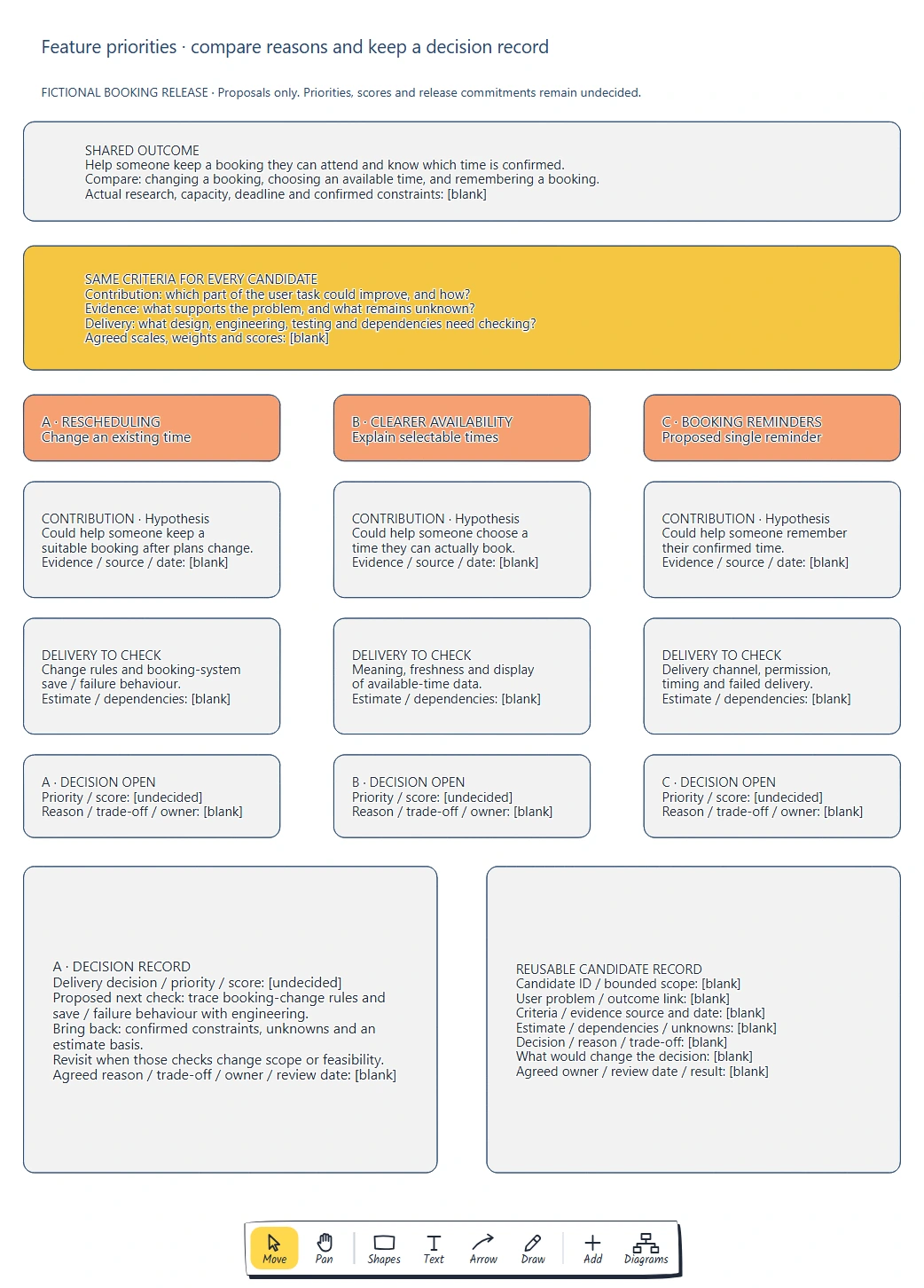
Read down each candidate and across the same row to compare it. Every priority remains open; the board shows the information needed for a decision.
Compare the reasons and evidence
Fill in the contribution as a short hypothesis, then attach the supporting evidence when you have it. For A: changing an existing time could help someone keep a suitable booking after their plans change. That is a reason to investigate rescheduling, not proof that it should lead the release.
For B, ask whether people can identify a time they can actually book. For C, ask whether remembering the confirmed time is a problem a reminder would address. Keep the question specific enough to check against observations, support themes or an appropriately defined aggregate measure.
Write the source and date beside a finding. State what it supports and where its limits are. A request for reminders from one person tells you about that request; it does not establish how often other people miss bookings or why.
Now read the delivery row. A needs questions about change rules and what the booking system does when saving a change fails. B needs clarity about the meaning and freshness of availability data. C needs decisions about a channel, permission, timing and failed delivery. These are questions to investigate, not claims about an existing system.
Ask the relevant specialists to assess total work, including testing and dependencies. Keep their estimate separate from a desired release date. If a crucial dependency is unknown, record it explicitly rather than giving the proposal a conveniently low score.
For an initial comparison of expected benefit and effort, use the impact-effort matrix guide to record conditional placements and identify the assumptions behind them before deciding a release priority.
Make the trade-off explicit
Once you have enough information to compare the candidates, discuss what you would give up by choosing one first. Would narrowing a feature's scope preserve the user's task? Would choosing a different candidate leave an important problem unresolved?
Atlassian's project trade-off analysis asks teams to discuss constraints and the reasoning behind different views, then document and revisit the result. This board uses a short written record for that conversation.
For a real decision, write the selected scope and the reason it comes before the alternatives. Name the evidence and constraint that mattered. Record an unresolved disagreement if the team has not settled it. Moving a card or collecting votes does not fill in that reasoning.
In the supplied example, the delivery decision stays open. The immediate proposed action is to investigate A's booking-change rules and save/failure behaviour with engineering. That action addresses a feasibility gap. It does not rank A above B or C, and user evidence is still needed for all three.
Record what would change the decision
A useful review condition names information that could alter the choice. “Review later” gives the team little to act on. “Revisit when the booking-change check changes A's scope or feasibility” identifies the uncertainty to bring back.
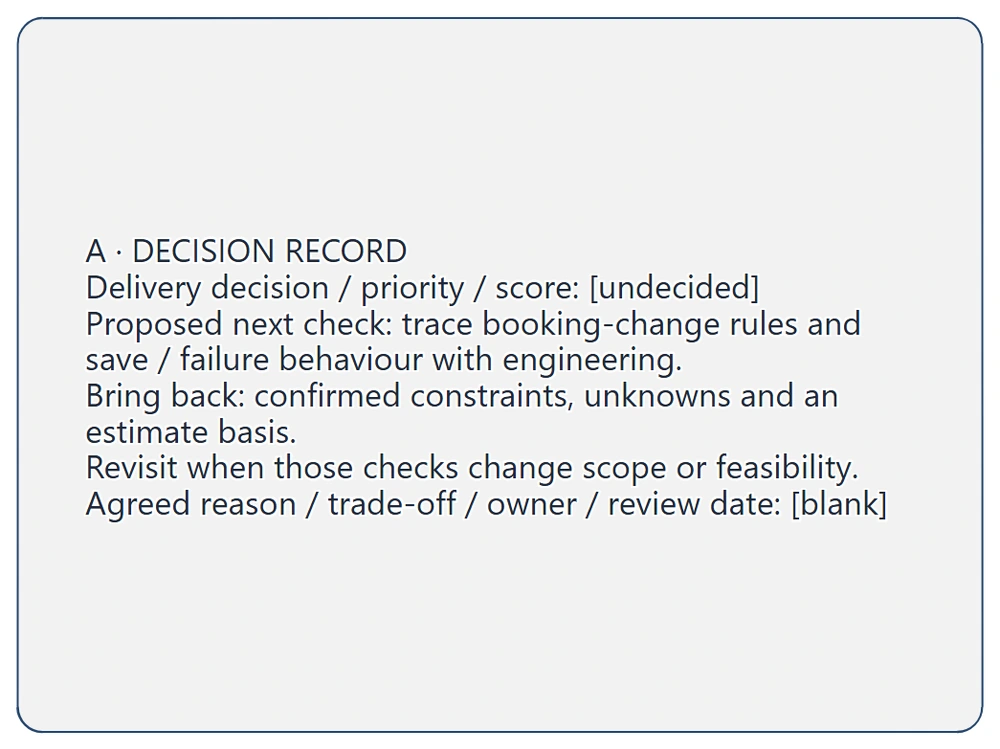
The proposed check asks for confirmed constraints, remaining unknowns and an estimate basis. The delivery decision, agreed owner and review date are still blank.
Ask someone to accept the next check and agree when the team will review its output. If the check shows that a time change cannot preserve a clear booking state, revise the proposal before comparing it again. If the gap can be resolved within a narrower scope, record that scope and update the delivery assessment.
Copy this feature decision record:
Candidate ID and bounded scope:
User problem and outcome:
Criteria and definitions:
Evidence source, date and limits:
Estimate basis and dependencies:
Decision and reason:
Trade-off and unresolved disagreement:
What would change the decision:
Next check and expected output:
Agreed owner and review date:
Finding and updated decision:
Retain the previous reason when the decision changes. A teammate joining later should be able to see what the team knew, what changed and why the priority moved.
To share the intended changes and unresolved work beyond a single feature decision, use the outcome-based roadmap guide to connect possible work to observable outcomes and make commitment status clear.
When the next step is to evaluate an interface change, use the product experiment planning guide to agree the comparison, measures and stopping conditions before implementation.
Review checklist
- Do the candidates address an agreed outcome at a comparable scope?
- Can everyone apply the criteria and explain any scores?
- Does each claimed finding have a source, date and clear limits?
- Are total delivery work, dependencies and constraints visible?
- Does the decision record explain the trade-off?
- Is there a specific condition for revisiting it?
- Has someone accepted the next action and review date?
Takeaways
A useful board keeps the reasons behind a priority close to the feature. Compare each proposal using the same questions, keep evidence separate from assumptions and record the choice with its trade-off.
When information is missing, make the next investigation explicit. Bring its result back to the same board so the team can revise the scope or decision with a clear record of why.
Optional: create the example with MCP
MCP lets a compatible AI assistant use EpicDraw's tools to create an editable planning diagram. You need a free EpicDraw account, cloud sync and an assistant supporting remote MCP with OAuth sign-in. Only synced pages are available to the remote connection.
Follow the MCP connection guide. Add https://epicdraw.app/mcp in your assistant and approve permission to create and edit diagrams.
Use this prompt for the worked example:
Using the connected EpicDraw MCP server, create a new editable page named "Prioritisation and decision board". Leave existing pages unchanged.

Create a fictional booking-release board. Shared user outcome: help someone keep a booking they can attend and know which time is confirmed. Leave actual research, capacity, deadline and constraints blank. Use the same criteria for each candidate: contribution to that outcome, evidence for the problem, and total delivery work and dependencies. Leave agreed scales, weights, priorities and scores undecided.

Show three candidates side by side. A, rescheduling: change an existing time; hypothesis that it could help after plans change; check change rules and booking-system save/failure behaviour. B, clearer availability: explain selectable times; hypothesis that it could help someone choose a time they can actually book; check the meaning, freshness and display of availability data. C, booking reminders: explore a single reminder; hypothesis that it could help someone remember a confirmed time; check channel, permission, timing and failed delivery. Give each candidate blank evidence/source/date, estimate/dependency and decision/reason/trade-off/owner fields. Mark every decision open.

Add an A decision record with delivery decision, priority and score undecided. Proposed next check: trace booking-change rules and save/failure behaviour with engineering. Expected output: confirmed constraints, unknowns and an estimate basis. Revisit when those checks change scope or feasibility. Leave agreed reason, trade-off, owner and review date blank. Add a reusable candidate record with scope, user problem, outcome, criteria, evidence, estimates, dependencies, decision, trade-off, what would change it and agreed owner/date/result.

Use editable shapes and text, label the board fictional and keep research findings and release commitments blank. Check overlapping objects and overflowing labels, then return a PNG preview and private editor link. Leave the result as a draft for me to review.
Inspect the returned PNG and open the private editor link while signed in. Assistant layouts vary, so check the scope, criteria, blank evidence and undecided priorities before using the draft. The diagram does not validate a booking policy, conduct research or build a working booking feature.
Keep your next draft close
Create a free account to save your pages in the cloud and use them across devices.
Create a free accountYou can keep drawing without an account.