An outcome-based product roadmap helps a team explain what it wants to improve and what it still needs to learn. Start with a change you want people to experience, decide how you could observe it, then connect possible work to that change. Mark which parts are proposals and which are agreed commitments.
That gives a roadmap review a useful purpose: deciding whether the intended result still matters, whether the evidence supports the work and what needs checking next. This guide builds a planning view with an editable outcome roadmap template and a review record you can reuse.
Turn a theme into an observable change
A theme names an area of attention. “Easier setup” could cover many different problems. An outcome describes a change you want to see: more new organisers successfully publishing a usable booking page, for example.
A feature is one possible way to help. Adding a setup preview might contribute to that outcome, but shipping the preview would not establish whether setup had become easier.
Teresa Torres's guide to planning roadmaps under uncertainty distinguishes broad themes from outcomes with measures. Use that distinction when reviewing a heading. Ask who should be able to do what differently, and how you would tell.
You do not need to invent a percentage target to make the first draft useful. Name a candidate measure and record the definitions, baseline and reporting window still needed before anyone can agree a target.
Give the planning period a clear purpose
For the walkthrough, imagine a fictional scheduling product discussing a quarter. Its proposed direction is to help organisers and guests arrange and keep a suitable booking. Your job as the product lead is to make the intended changes, evidence gaps and commitments understandable.
The quarter is a planning boundary for this example. Its actual dates, business goal, capacity and chosen focus are blank. The three areas below are proposals to discuss; the example does not promise to deliver all three.
| Area | Proposed outcome | Candidate measure to define |
|---|---|---|
| Easier setup | More new organisers publish a usable booking page. | Share of new organisers who publish one; define “usable,” the cohort and the window. |
| Clearer availability | More eligible guests choose a time they can book. | Share who reach a selected time; define eligibility, selection and the window. |
| Fewer booking uncertainties | More guests identify the confirmed time after a booking change. | Share of observed change tasks with the correct answer; define the task and sample. |
These are original teaching examples, with no research findings, baselines, targets or agreed commitments behind them. The third measure concerns an observed task sample; it would not establish how every customer behaves.
For your roadmap, agree how the proposed product outcome supports the business goal before choosing a focus. Keep the user group and journey boundary explicit. A change that helps an organiser publish a page addresses a different part of the service from helping a guest understand a changed booking.
Atlassian's roadmap guidance brings company goals, customer information and engineering constraints into planning. It also recommends broader time periods when specific dates would imply too much certainty. Use a period your team can explain, and keep actual commitments visible within it.
Put possible work beneath the outcome it could help
With an intended change in place, ask what might improve it. Separate the need you are investigating from the proposed solution.
For easier setup, the question is whether organisers understand what their page will offer before publishing it. A setup preview is one possible response. For clearer availability, the question concerns understanding selectable times. Explanatory labels might help, but first the team needs to understand the availability data.
The third area asks whether guests can tell which booking is confirmed after a change. Clarifying the post-change result is possible work, with save and failure behaviour still to investigate.
Open the editable starter near the top of this page. It adds a fresh page alongside your existing drawings. Double-click a label to edit it. Replace the direction and outcome areas first, then add possible work underneath each one so a reviewer can trace why the idea belongs there.
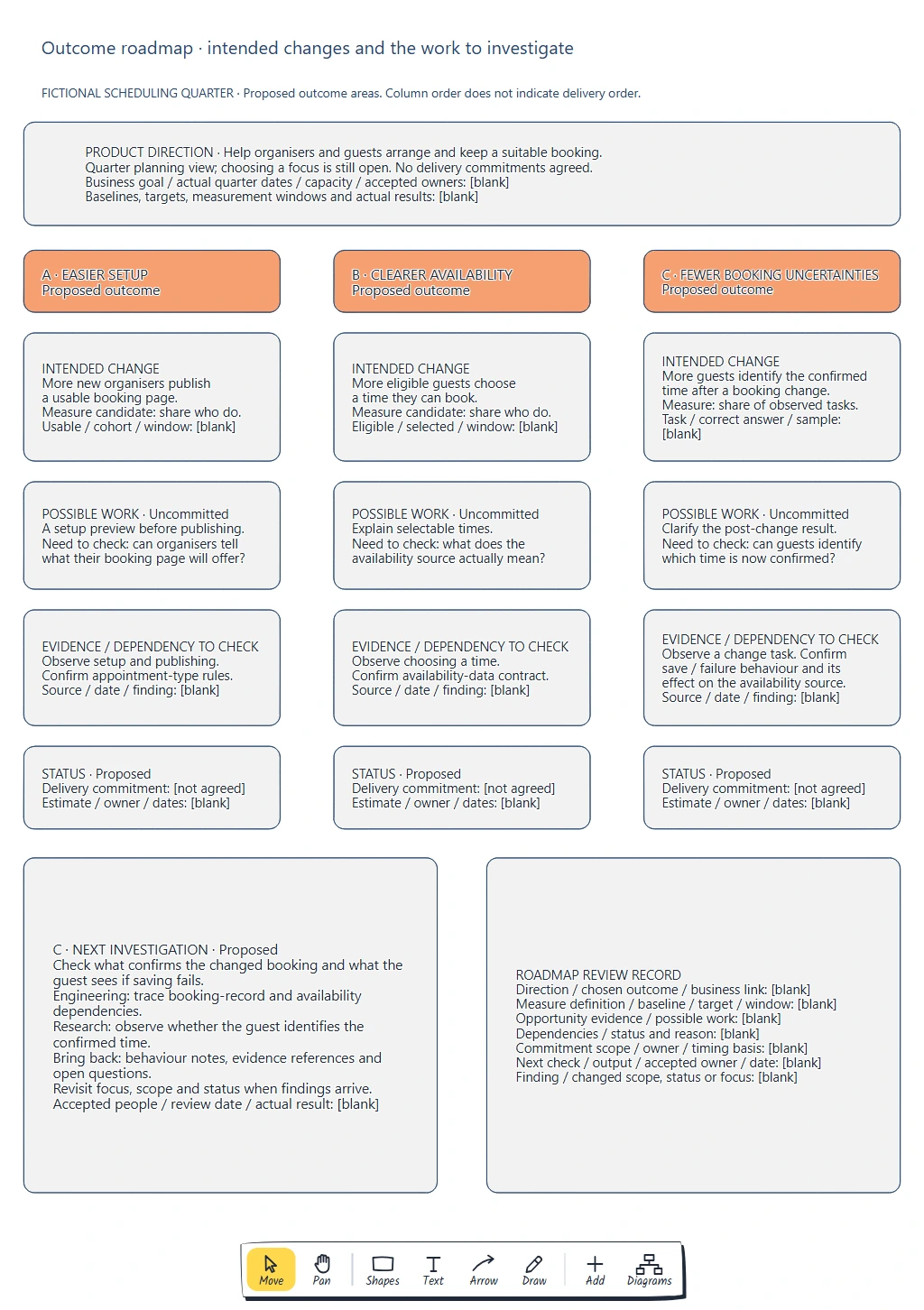
Each column holds a proposed outcome and the work that might help it. The status row keeps delivery commitments explicit; column order does not indicate a delivery sequence.
Keep the relationship open to challenge. If a reviewer cannot explain how an idea might affect the outcome, check the reasoning before giving it a place on the roadmap. More detail about the feature will not supply that missing link.
When choosing between possible approaches, use the feature prioritisation board to compare shared criteria and keep the decision reason before treating an idea as agreed work.
Show the evidence and dependencies still missing
Read down one outcome area and ask what would make its possible work feasible and useful.
The setup preview needs an understanding of appointment-type rules and how organisers currently prepare their pages. Availability explanations depend on what the source data means and how fresh it is. A clearer post-change result depends on the booking system's save and failure behaviour, as well as what the guest understands.
Those last two areas may share a dependency: how a changed booking affects the availability source. Record that as a question for engineering. The example does not assume a particular system contract or that one feature must ship before another.
Put permitted source references beside actual findings when you have them. Keep an unanswered question separate from evidence. “Confirm the availability-data contract” names work to do; it is not a finding that the data is unreliable.
This lets a review change the plan for a concrete reason. If a proposed label describes stale or ambiguous data, better copy alone may leave the underlying issue unresolved. The next investigation may need to examine the data before choosing an interface change.
Make commitment status easy to read
Agree what each status means on your roadmap. For this template, “Proposed” means an outcome or idea is available for discussion. Use “Investigating” when someone has accepted and started a defined check. Reserve “Committed” for work with an agreed scope, owner and timing basis, with dependencies understood well enough to support that agreement.
All three areas in the worked example remain proposed. Its delivery commitments are marked “not agreed.” A possible quarter of work is not an accepted delivery date.
For a real commitment, record the scope and where the agreement came from. Include the relevant date or delivery window and what would require renegotiation. If you have a firm external constraint, show it with its source rather than leaving readers to infer it from a column heading.
Share the detail each audience needs. A leadership review may focus on the intended change and unresolved dependency. People preparing a launch also need the specific capability, scope and timing that have actually been agreed.
Use the next investigation to update the roadmap
For the third area, propose checking what confirms a changed booking and what the guest sees if saving fails. Engineering can trace the booking-record and availability dependencies. Research can examine whether the guest identifies the confirmed time in the relevant task.
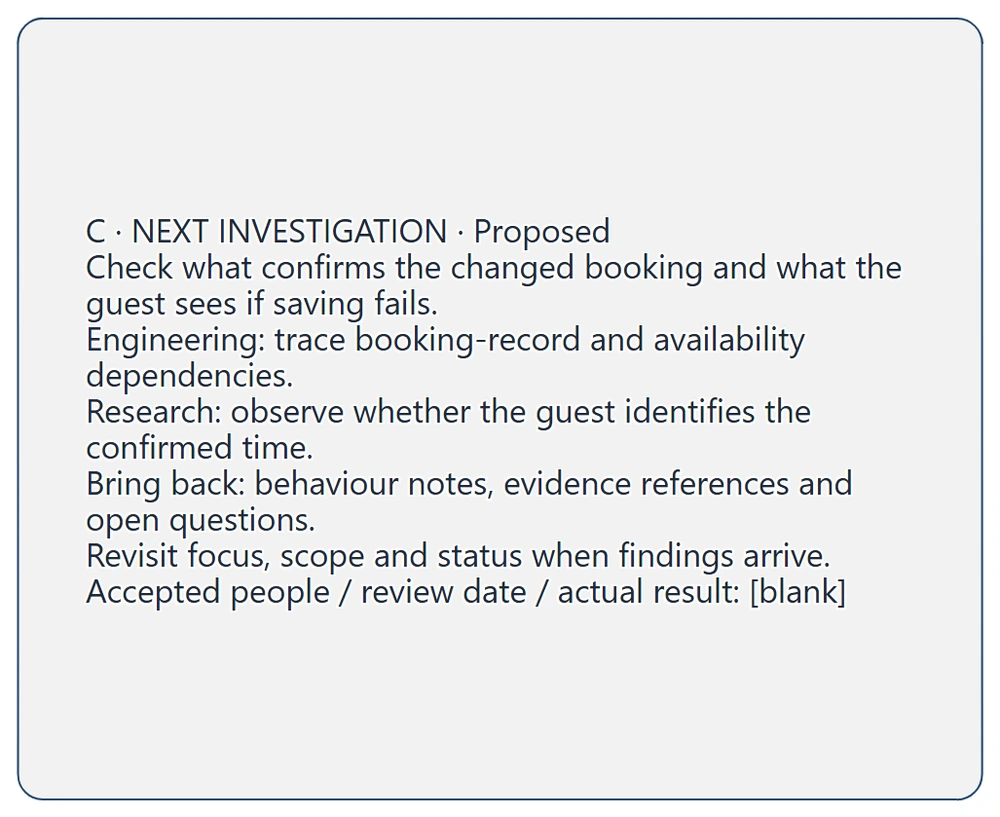
The check should return behaviour notes, evidence references and open questions. Accepted people, the review date and actual results still need filling in.
Ask people to accept those actions and agree when the findings will return. A system trace can clarify behaviour; it cannot establish what a guest understands. Keep the outputs distinguishable when reviewing the result.
Then update the same outcome area. The findings may change the scope, reveal a dependency or show that a different problem deserves attention. Record the reason for changing the focus or status so someone joining later can follow the decision.
Copy this outcome roadmap review record:
Product direction and business goal:
User group and intended change:
Chosen focus and planning boundary:
Measure definition, population and window:
Baseline and target, when agreed:
Opportunity evidence and source:
Possible work and why it may help:
Dependencies and unresolved questions:
Commitment status and reason:
Agreed scope, owner and timing basis:
Next check, output, accepted owner and date:
Finding and changed focus, scope or status:
When people accept the next investigation, use the product Kanban handoff guide to track its owner, completion check and any blocker until the findings return.
Review checklist
- Does each outcome describe an observable change for a defined group?
- Are the measure's definitions and missing baseline or target clear?
- Can someone explain how the possible work might help?
- Are evidence gaps and dependencies visible?
- Can a reader distinguish proposals, investigations and commitments?
- Are genuine commitments supported by an agreed scope, owner and timing basis?
- Will the next investigation return a useful result to this roadmap?
Takeaways
An outcome-based roadmap gives the team a result to work towards while leaving possible solutions open to investigation. Make the intended change observable, connect work to it and keep the evidence gaps beside the proposal.
Use clear commitment labels and specific next checks. When information changes, update the scope, status or chosen focus with a reason others can inspect.
Optional: create the example with MCP
MCP lets a compatible assistant use EpicDraw's tools to create an editable planning diagram. You need a free EpicDraw account, cloud sync and an assistant supporting remote MCP with OAuth sign-in. Only cloud-synced pages are available remotely.
Follow the MCP connection guide, add https://epicdraw.app/mcp in your assistant and allow it to create and edit diagrams.
Use this prompt for the worked example:
Using the connected EpicDraw MCP server, create a new editable page named "Outcome roadmap and uncertainty notes". Leave existing pages unchanged.

Create a fictional scheduling-product quarter planning view. Direction: help organisers and guests arrange and keep a suitable booking. Choosing a focus is still open. Leave the business goal, actual quarter dates, capacity, accepted owners, baselines, targets, measurement windows and results blank. Column order must not imply delivery order. No delivery commitments are agreed.

Use three proposed outcome areas. A, easier setup: more new organisers publish a usable booking page. Candidate measure: share who do; leave usable, cohort and window definitions blank. Possible uncommitted work: a setup preview before publishing. Investigate what organisers understand their page will offer, observe setup/publishing and confirm appointment-type rules.

B, clearer availability: more eligible guests choose a time they can book. Candidate measure: share who do; leave eligibility, selection and window definitions blank. Possible uncommitted work: explain selectable times. Observe choosing a time and confirm the meaning, freshness and contract of availability data.

C, fewer booking uncertainties: more guests identify the confirmed time after a booking change. Candidate measure: share of observed change tasks; leave task, correct-answer and sample definitions blank. Possible uncommitted work: clarify the post-change result. Observe a change task and confirm save/failure behaviour and effects on the availability source.

For every area leave source, date and actual finding blank. Status is Proposed; delivery commitment is not agreed; estimate, owner and dates are blank. Add a proposed C investigation: engineering traces booking-record and availability dependencies; research observes whether the guest identifies the confirmed time. Bring back behaviour notes, evidence references and open questions. Revisit focus, scope and status when findings arrive. Accepted people, review date and actual result stay blank. Add a reusable roadmap record for direction, chosen outcome, business link, measure definitions, evidence, possible work, dependencies, commitment status/scope/owner/timing basis, next check and changed focus or status.

Use editable shapes and text, label the page fictional, check overlaps and overflowing labels, and return a PNG preview and private editor link. Leave the diagram as a draft; do not invent research, dates, commitments or results.
Inspect the PNG and open the private editor link while signed in. Assistant layouts vary, so check the outcome wording, measure gaps, uncommitted work and status labels. Creating the diagram does not establish research findings, agree delivery commitments or build a scheduling application.
Keep your next draft close
Create a free account to save your pages in the cloud and use them across devices.
Create a free accountYou can keep drawing without an account.