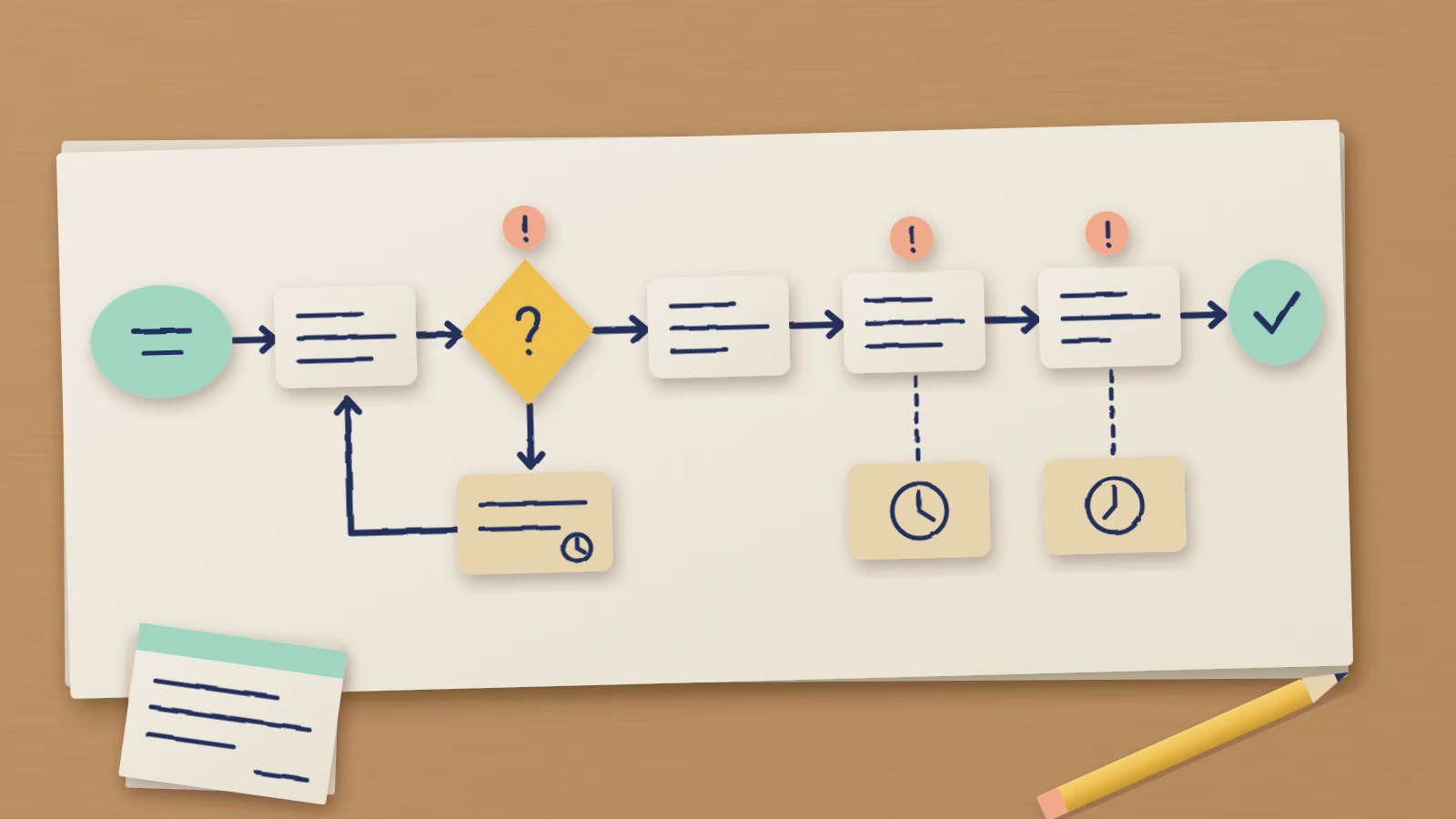
A process map shows how a piece of work moves from the moment it starts to the moment it's done: each step, who does it and where it goes next. Drawn well, it shows a team where work slows down, where it gets passed around and where it goes back to the start. That makes it the place to begin before you change how anything works.
The catch is that the easiest map to draw is the official procedure, and the procedure is rarely what happens. This guide covers how to make a process map of the real work: fix where the process starts and stops, walk it with the people who do each step, record every handoff and wait, and finish with a short list of problems that each have an owner. The editable process map template on this page follows the same structure.
What a process map is for
The NHS Institute for Innovation and Improvement's Handbook of Quality and Service Improvement Tools, now hosted by NHS England, describes conventional process mapping as a session that brings together people from each role involved, so everyone can discuss the steps actually taken. It says the map should capture the reality of the process and expose duplication, unhelpful variation and unnecessary steps. It also advises mapping before you change anything, because changes made without that understanding can make the process worse or create problems elsewhere.
Two pieces of its advice shape the rest of this guide. Map what actually happens in the current process, not what should happen. And keep the map plain: in the handbook's words, "the best map is the simplest map that provides that insight". A box for each step, a diamond for each question and an arrow for the direction of flow are enough.
If you need to document the agreed route with its decisions and exceptions for new staff, make a flowchart people can follow instead.
Set where the process starts and stops
To keep this concrete, the guide follows Fernhill Joinery, a fictional furniture workshop. The company, its people and its numbers are invented. You're the operations lead, and suppliers have complained that Fernhill pays late. Fernhill's suppliers only care about being paid on the terms they agreed. Your job is to find out where their invoices go after they arrive.
Before anyone draws a box, agree the boundaries. UC Berkeley's Business Process Management Office, in its guidance on documenting a process, says to establish them first: know what triggers the process, what it produces, and what is in and out of scope. The NHS handbook gives the same reason for defining the start and end. It sets the scope and frames the detailed map.
At Fernhill the process starts when a supplier invoice reaches the accounts inbox and ends when the supplier is paid in a payment run. Placing orders and adding new suppliers are out of scope. Writing that down settles arguments later: when someone starts describing how orders are approved, the scope card says that belongs on another map. The scope also tells you who to invite, which is anyone who touches an invoice between the inbox and the payment run.
If your question is what customers go through at each stage rather than what happens inside your team, map their journey with evidence beside each touchpoint instead.
Walk it with the people who do it
Fernhill has a written procedure with four steps: log, match to the purchase order (PO), approve, pay. A map of those four boxes would say nothing about late payments.
Instead, walk one recent invoice through the process with the people who handled it. Berkeley's guidance is to walk through every step with the people who actually perform it and to watch for workarounds, informal steps and manual fixes that never made it into a document. The NHS handbook warns that the map will have gaps if some staff aren't invited, and it reminds hospital teams to invite administrative staff, who often see the work differently.
At Fernhill that meant four people: Maya, the accounts payable (AP) clerk; Sam in goods-in; Owen, the workshop manager who approves spend; and Ruth, the finance manager who runs payments. Ask each person what they do, what they need before they can start and who they pass the work to.
Their answers changed the map straight away. Some invoices arrive without a PO number, so Maya emails the supplier and waits for it to be resent. That's a loop the procedure doesn't mention. Matching an invoice also needs the delivery slip, which proves the goods arrived, and the slips are kept on paper in the workshop. So Maya asks Sam for the slip, and Sam finds it and sends a photo. The four official steps became six, plus a decision about the PO number.
Write the role on every step as well as the action. "AP clerk: Maya matches it to the PO" tells the reader who to ask about that box and shows where the work changes hands.
Record handoffs and waits
With a role on every step, the handoffs are easy to see. A handoff is any point where the work passes from one person to another. The NHS handbook asks how many there are and whether any are unnecessary. Berkeley recommends a swimlane layout for cross-functional work because it makes handoffs visible. Fernhill's map is short enough to label each one on the arrow instead.
Then ask about time: how long each step takes, and how long the work sits before the next person picks it up. The handbook asks the same two questions. Write each wait in its own box under the step it delays, with the reason in a few words.
Unless you've measured the times, label them as the team's estimates. Fernhill's team thought the hands-on work for one invoice came to about 20 minutes. The waits were much longer: up to 3 days for a missing PO number, 2 to 4 days for a delivery slip, up to 7 days for approval because Owen approves invoices on Fridays, and up to 14 days for the payment run, which happens on the 1st and 15th of the month. Added up, an invoice spends between 2 and 28 days waiting.
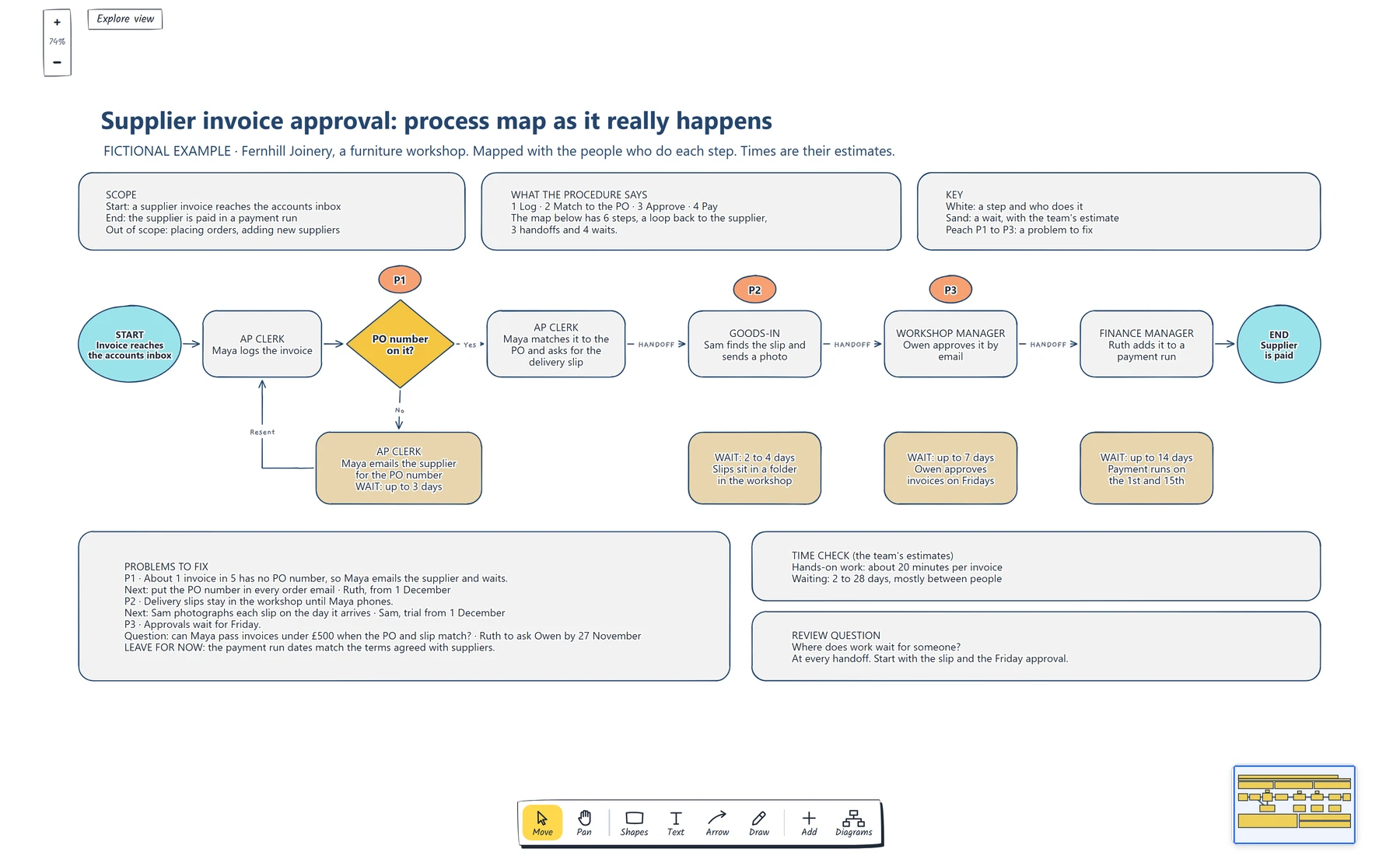
Compare the procedure card at the top with the row below it, then read the sand boxes from left to right. Every wait sits on a handoff or on the loop back to the supplier.
The time check makes the review question easy to answer: where does work wait for someone? At Fernhill, at every handoff.
Mark the problems to fix
A map is finished when it tells you what to do. Go through the waits and decide which ones are problems, then tag each one on the map so the list and the picture point at the same place. Fernhill tagged three: P1 on the PO number check, P2 on the delivery slip and P3 on approval.
Not every wait is a problem. The payment run dates match the terms Fernhill agreed with its suppliers, so the team left that wait alone and wrote down why. Recording the decision saves the next review from going over it again.
Each problem then gets a next step and an owner. Sometimes the next step is a question. Whether Maya can pass small invoices without Owen is a change to a spending control, so P3 records the question and who will ask it.
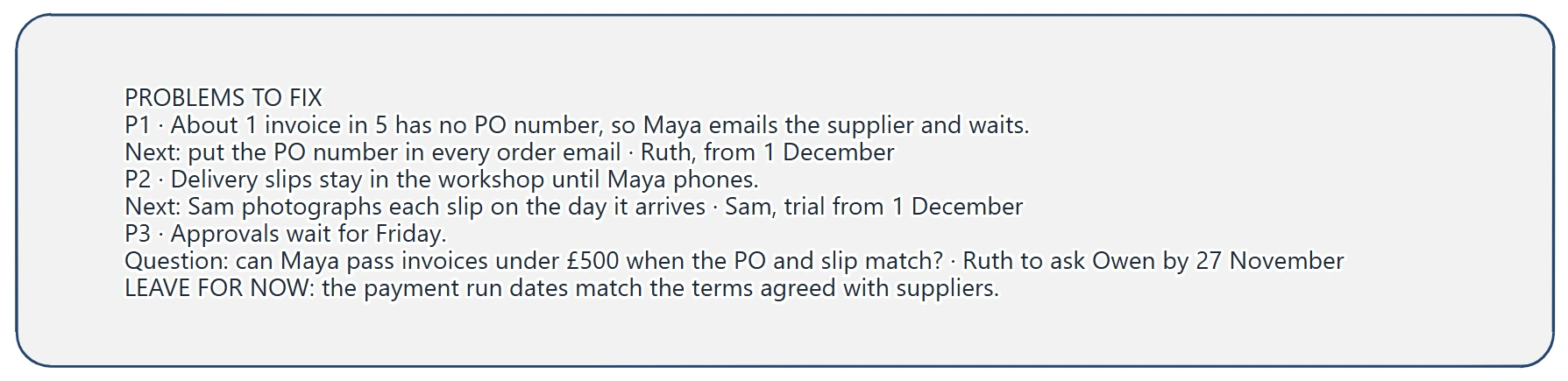
Check that each problem names where it happens, a next step and an owner with a date. P3 is a question to ask, so it has no decision yet.
Finally, take the draft back to the people you walked it with. Berkeley's guidance is to bring the draft back to the people who do the work and close the gaps before moving on. Fernhill hasn't changed anything yet. It does know where its invoices wait, which of those waits it plans to fix and who is doing what by when. For the full accounts payable process with a three-way match and payment controls, the accounts payable process flowchart template has lanes for the supplier, AP clerk, budget holder and treasury.
You can open the editable starter near the top of this page to map your own process. It adds a new page and leaves your existing drawings alone. Double-click a box to change its text, and select a box and choose a new Fill colour to mark it as a wait.
If a wait keeps coming back and the team cannot agree why, sort its possible causes on a fishbone diagram before you choose a fix.
Review checklist
Copy this worksheet before you share the map:
Process name:
Start (the event that triggers it):
End (what it produces):
Out of scope:
People walked through it, and their roles:
Steps, each with a role and an action:
Loops back to an earlier step:
Handoffs:
Waits, each with an estimate and a reason:
Waits that are problems, tagged on the map:
Waits left alone, and why:
Next step, owner and date for each problem:
Date the draft was checked with the team:
Before sharing, read the map from start to end and ask the question on the board: where does work wait for someone?
Optional: create the example with an AI assistant
If you use an AI assistant that supports remote MCP with OAuth sign-in, you can ask it to build this process map example in your EpicDraw workspace. MCP is the connection that lets the assistant use EpicDraw's diagram tools.
This route needs a free EpicDraw account and cloud sync. Open More, choose Connect AI assistant and add https://epicdraw.app/mcp in your assistant. When EpicDraw asks you to approve the connection, allow it to create and edit diagrams. The MCP connection guide walks through each step.
Paste this prompt into the connected assistant:
Using the connected EpicDraw MCP server, create a new editable page named "Supplier invoice process map and problem list". Leave existing pages unchanged.

Build a fictional process map of supplier invoice approval at Fernhill Joinery, a furniture workshop. Add a scope card (start: a supplier invoice reaches the accounts inbox; end: the supplier is paid in a payment run; out of scope: placing orders and adding new suppliers) and a card with the official procedure: Log, Match to the PO, Approve, Pay. In one row from left to right, draw a START oval, "AP CLERK: Maya logs the invoice", a decision diamond "PO number on it?", "AP CLERK: Maya matches it to the PO and asks for the delivery slip", "GOODS-IN: Sam finds the slip and sends a photo", "WORKSHOP MANAGER: Owen approves it by email", "FINANCE MANAGER: Ruth adds it to a payment run" and an END oval "Supplier is paid". Connect them with arrows, label the Yes branch, and label the three arrows where work passes to another person "HANDOFF". From the No branch, add a sand box "Maya emails the supplier for the PO number, WAIT: up to 3 days" with an arrow back to the logging step. Under the last three steps add sand wait boxes: "2 to 4 days, slips sit in a folder in the workshop", "up to 7 days, Owen approves invoices on Fridays" and "up to 14 days, payment runs on the 1st and 15th". Tag the PO check, the slip step and the approval step P1, P2 and P3 in peach. Add a key, a time check card (about 20 minutes of hands-on work, 2 to 28 days of waiting, both team estimates), a problems to fix card with a next step, owner and date for P1 to P3, and the review question "Where does work wait for someone?".

Use editable shapes, text and connectors. Label the example as fictional and mark the times as estimates. This is a visual planning draft. Check for overlapping objects and overflowing labels, then return a PNG preview and the private editor link. Leave the result as a draft for me to review.
Open the returned private editor link while signed in. The assistant's layout may differ from the screenshot, and it knows nothing about your process. Replace the fictional steps, names and times with what you hear when you walk your own process with the people who do it.
Takeaways
- Map the process as it happens today, with the people who do each step, and check the draft with them before you act on it.
- Agree where the process starts and stops first, so everyone knows what belongs on the map and who to invite.
- Write a role on every step, so handoffs show up wherever the role changes.
- Record each wait under the step it delays, with an estimate and a reason.
- Tag the waits you'll fix, give each a next step and an owner, and write down why you're leaving the others alone.
Keep your next draft close
Create a free account to save your pages in the cloud and use them across devices.
Create a free accountYou can keep drawing without an account.