Design / Free editable template

Value stream map with a timeline and data collection sheet template

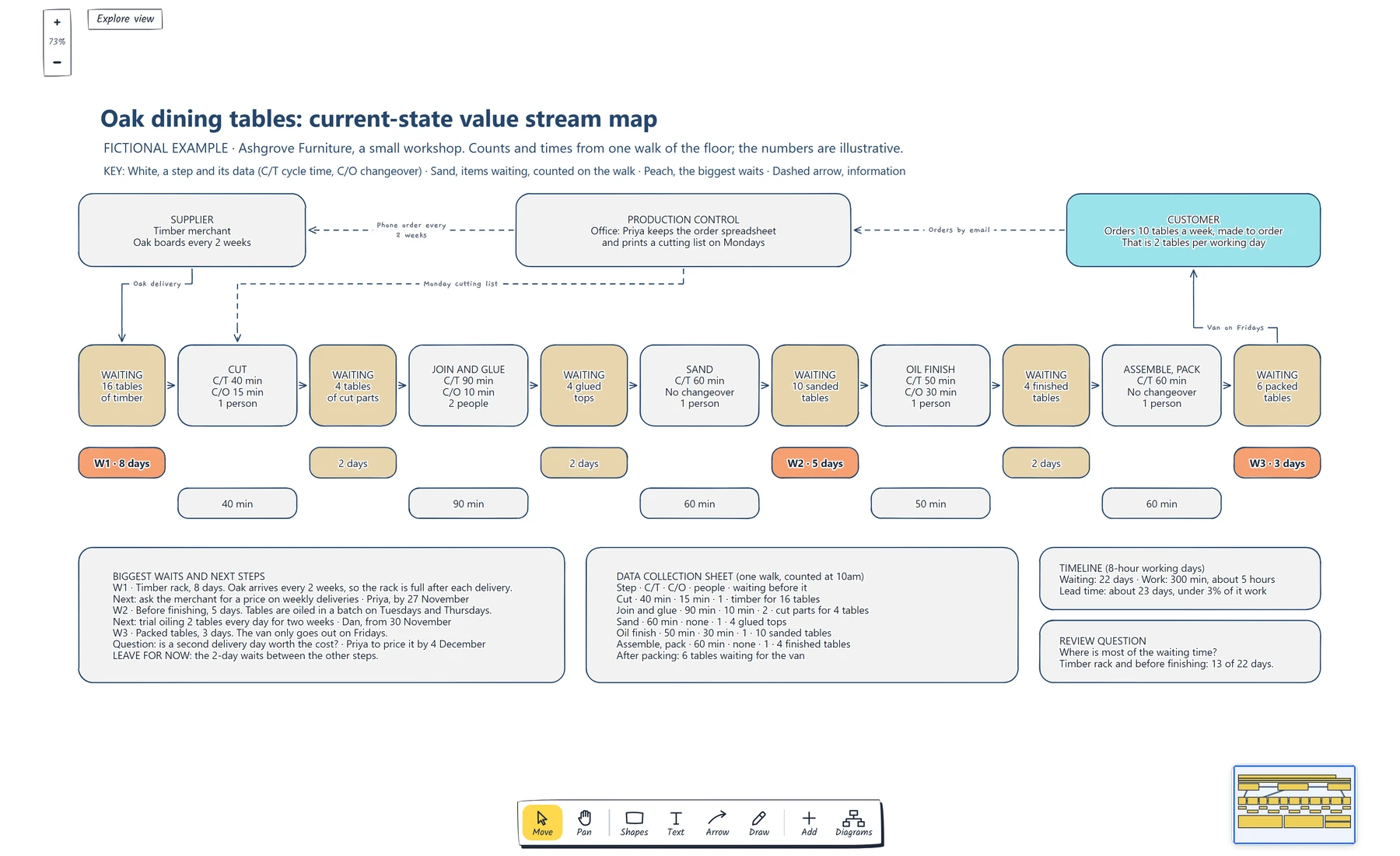
Pick one product family, walk the floor and record each step's cycle time, changeover, people and the stock waiting in front of it. Draw the steps and waits with the information flow above them, convert each pile into days of demand, then tag the biggest waits and give each a next step and an owner.

No account needed · Opens as your own editable page

Preview the value stream map with a timeline and data collection sheet

View full-size preview ↗
Value stream map with a timeline and data collection sheet example showing choose one product family by the final steps its products share., walk the floor and record cycle time, changeover, people and items waiting at each step., draw the information flow as well as the material flow.
Everything in this example is editable. Replace the labels, move the shapes and adapt the layout to your work.

How to use this template

  1. What a value stream map shows

    Value stream maps get stuck on symbols before anyone has walked the floor, counted what is waiting or timed the work.

  2. Choose one product family

    Map one product family from order to delivery, turn the stock you count into days of waiting, and leave with the biggest waits and a next step for each.

  3. Walk the flow and collect timings

    Map one product family, chosen by the steps its products share near the customer end. Walk the floor yourself and count what is waiting at each step at the same time of day, with cycle times you have timed. Draw the information flow as well as the material, because how each step finds out what to make often explains the piles. Convert each pile into days of demand, so the timeline shows how little of the lead time is work. Tag the biggest waits, give each a next step or question with an owner, and draw the future state once you know what worked.

Questions about this template

Can I change the example content?

Yes. Every label, box and line is editable, so replace the fictional example with your own screens and notes.

Do I need an account to use it?

No. Open the template and edit it in your browser. Your work saves on this device. An account is optional if you want to sync your workspace.

Can I export the finished diagram?

Yes. Use Export in the editor to save a PNG, SVG or PDF, or download an editable .epicdraw backup.