Design / Free editable template

Process map with handoffs, waits and a problem list template

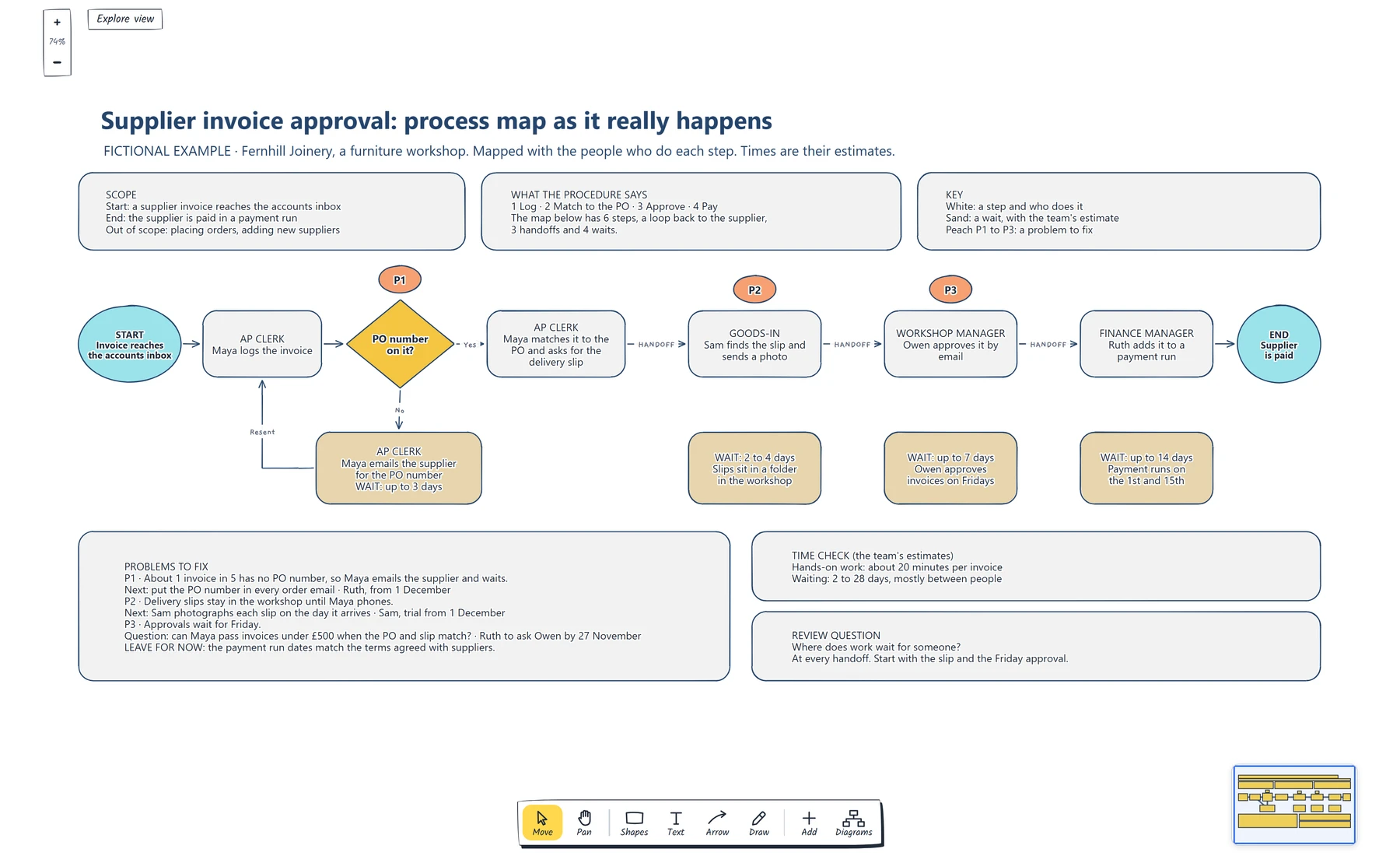
Agree where the process starts and stops, then walk one real case through it with the people who do each step. Write a role on every step, record each handoff and wait with an estimate, and tag the waits you will fix with a next step and an owner.

No account needed · Opens as your own editable page

Preview the process map with handoffs, waits and a problem list

View full-size preview ↗
Process map with handoffs, waits and a problem list example showing write the start, the end and what is out of scope., walk one real case through the process with the people who do each step., put a role on every step and label each handoff.
Everything in this example is editable. Replace the labels, move the shapes and adapt the layout to your work.

How to use this template

  1. What a process map is for

    Process maps copy the official procedure, so they miss the loops, handoffs and waits that slow the real work down.

  2. Set where the process starts and stops

    Map a process as it happens with the people who do each step, record every handoff and wait, and leave with a list of problems that each have an owner.

  3. Walk it with the people who do it

    Map the process as it happens today, with the people who do each step, and check the draft with them before you act on it. Agree where the process starts and stops first, so everyone knows what belongs on the map and who to invite. Write a role on every step, so handoffs show up wherever the role changes. Record each wait under the step it delays, with an estimate and a reason. Tag the waits you'll fix, give each a next step and an owner, and write down why you're leaving the others alone.

Questions about this template

Can I change the example content?

Yes. Every label, box and line is editable, so replace the fictional example with your own screens and notes.

Do I need an account to use it?

No. Open the template and edit it in your browser. Your work saves on this device. An account is optional if you want to sync your workspace.

Can I export the finished diagram?

Yes. Use Export in the editor to save a PNG, SVG or PDF, or download an editable .epicdraw backup.