
A checkout flow helps your team agree how a buyer gets from a basket to a confirmed order, including what happens when they cannot continue. It makes missing decisions about addresses, payment and recovery visible before you design the individual screens.
Start with the route through a successful purchase. At each decision, add the outcome that prevents progress and show where the buyer can go next. This guide follows a guest checkout example, including a declined payment, with an editable diagram and a checklist you can reuse.
Decide what the flow needs to explain
A flow records steps, decisions and outcomes. Figma describes user flows as the steps taken to complete a task. For checkout, the task includes understanding the order, providing the necessary details and knowing whether the purchase succeeded.
Choose a clear starting point and end state. A basket ready for review is a useful boundary for this example. The end is an order that the shop has confirmed, with information the buyer can recognise and refer to later.
Write down what each decision checks. “Address valid?” needs a definition: required information, accepted formats and any delivery restrictions your shop applies. “Checkout result?” needs a trusted answer about payment and the order. A button click or a page loading does not establish that result.
Give the checkout one buying task
Our worked example is a fictional guest buying a backpack. The selected product is already in the basket; the buyer needs to check the order, enter contact and delivery details, choose delivery and submit payment. The first payment attempt is declined.
Your team's job is to agree the screens, messages and recovery routes. The buyer needs to complete the purchase without wondering whether an order already exists. Stock, delivery costs, payment rules and confirmation channels remain open questions in the example.
Write the task beside the diagram: “Buy the selected backpack and understand the order result.” Add the review question: “How does the buyer know whether the order succeeded?”
Use those questions to choose the main steps:
| Step | Buyer needs to understand |
|---|---|
| Basket review | Selected item, option, quantity and available cost information |
| Guest details | Which contact and address details are required |
| Delivery choices | Available methods, costs and any timing information the shop can substantiate |
| Payment and review | The order summary, final amount and what submitting payment does |
| Order confirmation | Whether the shop accepted the order and what happens next |
Keep a route back to earlier details where the buyer needs to correct them. When a change affects delivery options or the amount, record which answers must be checked again.
Use the product page wireframe guide to agree the selected item, options and delivery questions that checkout needs to carry forward.
Draw the main route in EpicDraw
Open the checkout flow diagram template near the top of this guide. It adds a new editable page and preserves your existing drawings. You can also download the worked example and open it with the app's Import option.
The example places the main route down the left: basket, guest details, address check, delivery choices, payment, checkout result and order confirmation. Recovery states sit beside the decisions that lead to them. Arrows show both the next step and the return route.
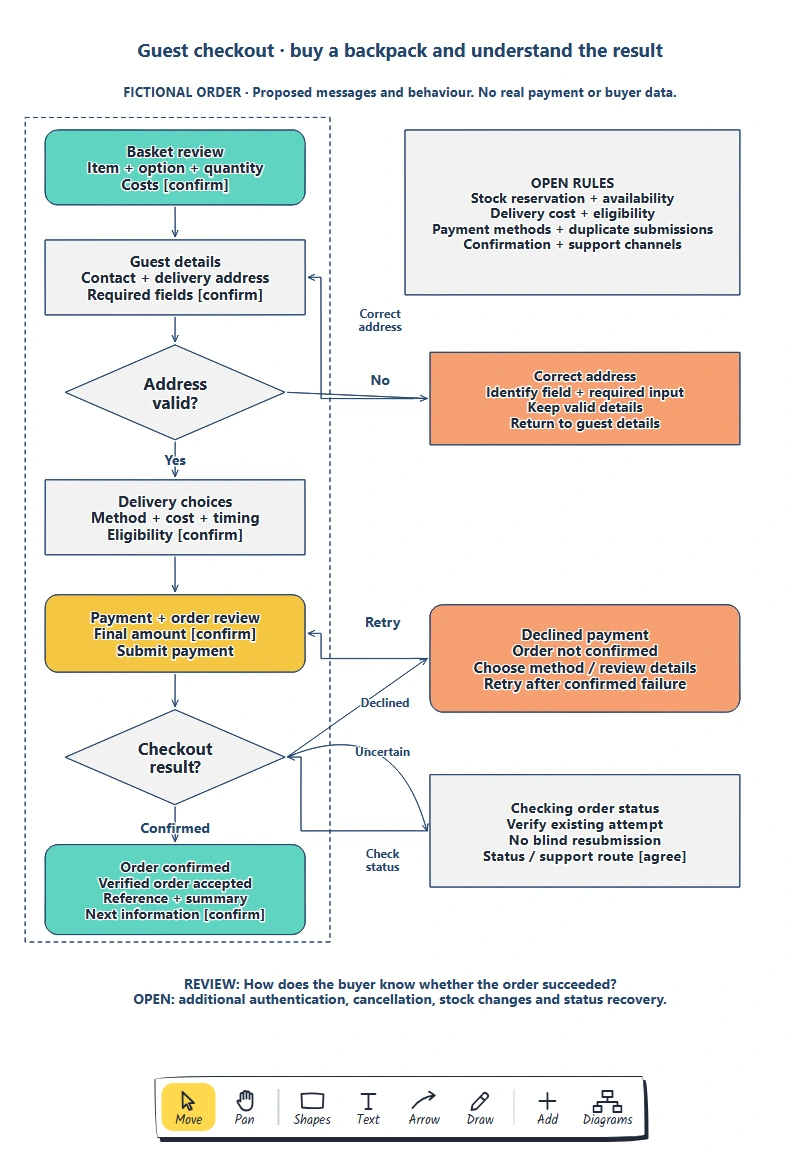
Each recovery state belongs to a specific decision. Its return arrow makes it possible to follow the buyer back into checkout.
Double-click a label to edit it. Replace the task and basket contents first, then the details your shop needs. Keep the decision labels short and put their rules in a notes area. “Address valid?” is easier to follow when the nearby note defines what valid means.
Give branch labels a meaning too. “Yes” and “No” work for the address check. The result decision needs more specific labels: confirmed, declined or uncertain. Those states need different messages and actions.
Add address correction before delivery
The address branch proposes returning the buyer to the details form when required information is missing or rejected. Show which field needs attention and what they can do to correct it. Preserve details that can safely remain so they can focus on the problem.
For a missing field, a proposed message could be “Enter your postal code to continue.” Adapt it to the country and the actual validation rule. Do not assume every country uses the same address structure or postal-code format.
W3C's form-validation guidance covers identifying required input, accommodating different formats and letting people review their information before a purchase. Use the flow to record those requirements, then check the implemented messages and controls for accessibility.
Address format checks and delivery eligibility are separate questions. If the shop cannot deliver to an otherwise complete address, the buyer needs an explanation and an appropriate next step. Mark that rule as open until the responsible team confirms it.
Make declined payment recoverable
Follow the example buyer to payment. They review the selected item, delivery choice and final amount, then submit. The result is a confirmed decline, so the flow takes them to a recovery state with a route back to payment.
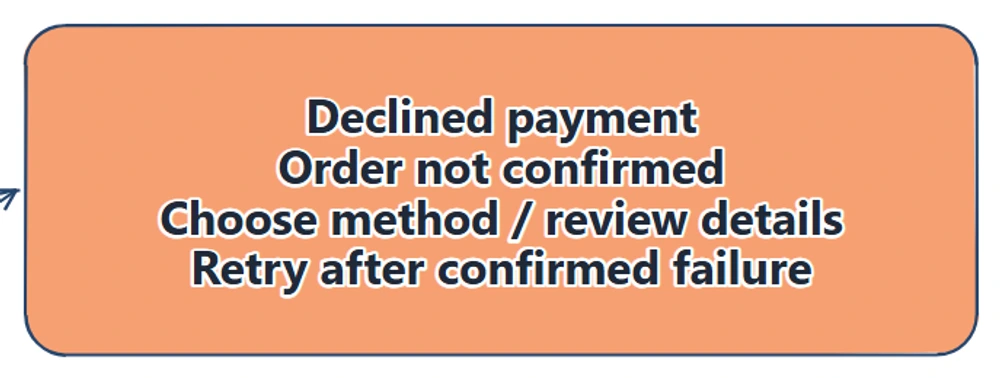
The proposed recovery message explains the order state and offers a next action. Retry returns to payment after the failure has been established.
Draft a message your teammate can review: “We couldn't complete the payment. Your order isn't confirmed. Choose another payment method or review the details before trying again.” This is proposed copy for the fictional flow; confirm it against the shop's actual order and payment states.
Keep appropriate basket and delivery information available during recovery. Payment details need the handling supported by your payment provider; this diagram does not specify storing card data. Agree what the buyer sees again, what they can change and whether an earlier delivery or stock check must be repeated.
Draw the retry arrow back to payment. Give the engineering team the questions behind it: how does the retry refer to the same purchase, which outcomes permit retry and how are duplicate submissions handled? Recording those questions does not implement the safeguards.
Separate an uncertain result from a decline
A delayed response needs its own state. The buyer may have submitted payment without receiving a clear result, so the interface should not present a decline or invite another submission before the outcome is known.
The example's checking state proposes verifying the existing attempt, then returning to the result decision. Its status or support route remains open. Agree how the buyer can find an answer if they close the page or lose the connection.
Stripe's payment-status documentation distinguishes unsuccessful, processing and successful states and explains monitoring payment outcomes on the server. Check your own provider's behaviour when defining this branch. The browser reaching a return page is insufficient evidence for order fulfilment.
If a payment method requires authentication or another action, add that branch too. Decide how cancellation and an expired attempt return to checkout. The example covers a reviewable subset of the flow; its notes identify payment rules that still need agreement.
Make confirmation answer the buying question
The confirmed branch needs a verified order result. Show the order reference, purchased-item summary and the next information the buyer can expect. Confirm the actual wording, contact route and notification channel with the shop.
Distinguish order acceptance from later delivery. “Order confirmed” does not tell the buyer that the backpack has been dispatched. Record the next state or message when that distinction matters.
Ask a teammate to follow the complete purchase, then repeat it with the missing address field and declined payment. Finally, give them an uncertain result. Can they explain what happened, whether another action is appropriate and how they will recognise confirmation?
Record each question beside the relevant state. Separate unclear wording from an unresolved product rule, then give the next change an owner. Test the actual checkout and provider integration before relying on the proposed behaviour.
Once the states are agreed, use the low-fidelity wireframe guide to sketch the information and actions each screen needs.
Review checklist
Use this checkout flow checklist before sharing:
- The starting point, buying task and confirmed end state are explicit.
- Each decision has defined outcomes and an owner for unresolved rules.
- Address errors identify a correction and a route back to the form.
- A confirmed decline has a recovery message and retry path.
- An uncertain result is verified before another submission is offered.
- Confirmation explains the order result and the next information to expect.
- Stock, delivery, authentication, duplicate submissions and support questions are recorded.
Copy this worksheet for each branch:
Decision and rule being checked:
Outcome / message the buyer sees:
Information retained or checked again:
Next action and return state:
Evidence needed before retry or confirmation:
Unresolved rule / owner / next review date:
Implementation test to run:
Optional: create the example with an AI assistant
MCP connects an assistant to EpicDraw's diagram tools. If your assistant supports remote MCP with OAuth sign-in, you can ask it to create an editable checkout-flow draft.
Use a free EpicDraw account, enable cloud sync and approve permission to create and edit diagrams. Open More, choose Connect AI assistant and add https://epicdraw.app/mcp in your assistant. Only synced pages are available to the remote server. The MCP connection guide explains the steps.
Paste this prompt into the connected assistant:
Using the connected EpicDraw MCP server, create a new editable page named "Guest checkout flow and failure-path checklist". Leave existing pages unchanged.

Map a fictional guest checkout for a backpack order. Include basket review, address entry, invalid address recovery, delivery choices, payment, declined payment, retry and order confirmation. Mark unresolved stock and payment rules as open questions. Show how the buyer can tell whether the order succeeded.

Use editable shapes, text and connectors. Label the example as fictional and mark unknowns as open questions. This is a visual planning draft. Check for overlapping objects and overflowing labels, then return a PNG preview and the private editor link. Leave the result as a draft for me to review.
Inspect the preview and open the private editor link while signed in. Check branch labels, return routes and confirmation before adapting it. Layouts may differ from the screenshots. The assistant creates a planning diagram; it does not build a checkout, process a payment or verify a real order.
Takeaways
- Define the buyer's task and the evidence for a confirmed order.
- Give each error a message, an appropriate action and a return route.
- Keep confirmed failure separate from an outcome that is still unknown.
- Use the review to turn missing behaviour into owned decisions and implementation checks.
Keep your next draft close
Create a free account to save your pages in the cloud and use them across devices.
Create a free accountYou can keep drawing without an account.