
A one-page design brief gives a designer enough context to choose what to investigate and sketch next. Write down the user's problem, the evidence behind it, the boundaries of the work and the questions still needing answers. Finish with a next action and an owner.
You can start before you have all the answers. An empty evidence field tells the team what to find out; a confident sentence without a source can send the work in the wrong direction. This guide shows how to build a useful brief around an appointment rescheduling example, with an editable design brief template and a copyable worksheet.
What belongs in a one-page design brief
The brief should let someone explain why the work exists and where to begin. Keep the summary on one page, then link to supporting research, policies or technical notes when you have them.
Use these fields to make the first discussion concrete:
| Field | What the designer needs to know |
|---|---|
| Problem and user task | Who needs to do what, and what might be getting in their way? |
| Evidence | What supports the problem, where is the source, and what is still an assumption? |
| Scope and constraints | What can change, what is excluded, and which rules need confirmation? |
| Open questions | Which unanswered decisions affect the design, and who will answer them? |
| Success checks | What would you observe or measure to judge the result? |
| Next investigation | What should happen first, who owns it, and when will the team review it? |
A brief can change as the team learns. Atlassian's project poster method similarly separates the problem from validation work and updates the document as evidence arrives. The template here is an original, smaller design brief for choosing the next piece of work.
Define the problem before choosing the feature
For the walkthrough, imagine a fictional appointment service considering online rescheduling. There are no customer findings or measured results behind this example. The proposed user task is: "Move an existing appointment to a suitable time and know which booking is confirmed."
That task gives the product manager and designer something to investigate together. "Add a reschedule button" specifies a control while leaving the surrounding problem unexplained. A useful starting hypothesis is: "People may struggle to change an existing appointment and tell whether the change succeeded."
Label that sentence as a hypothesis until you have evidence. Ask whether people actually encounter this problem, where it occurs and what they do today. The answers may change the scope of the request.
Open the editable starter near the top of this page to write your own task. It adds a new page while preserving your existing drawings. The worked example is also available as an editable download you can open with Import in the app.
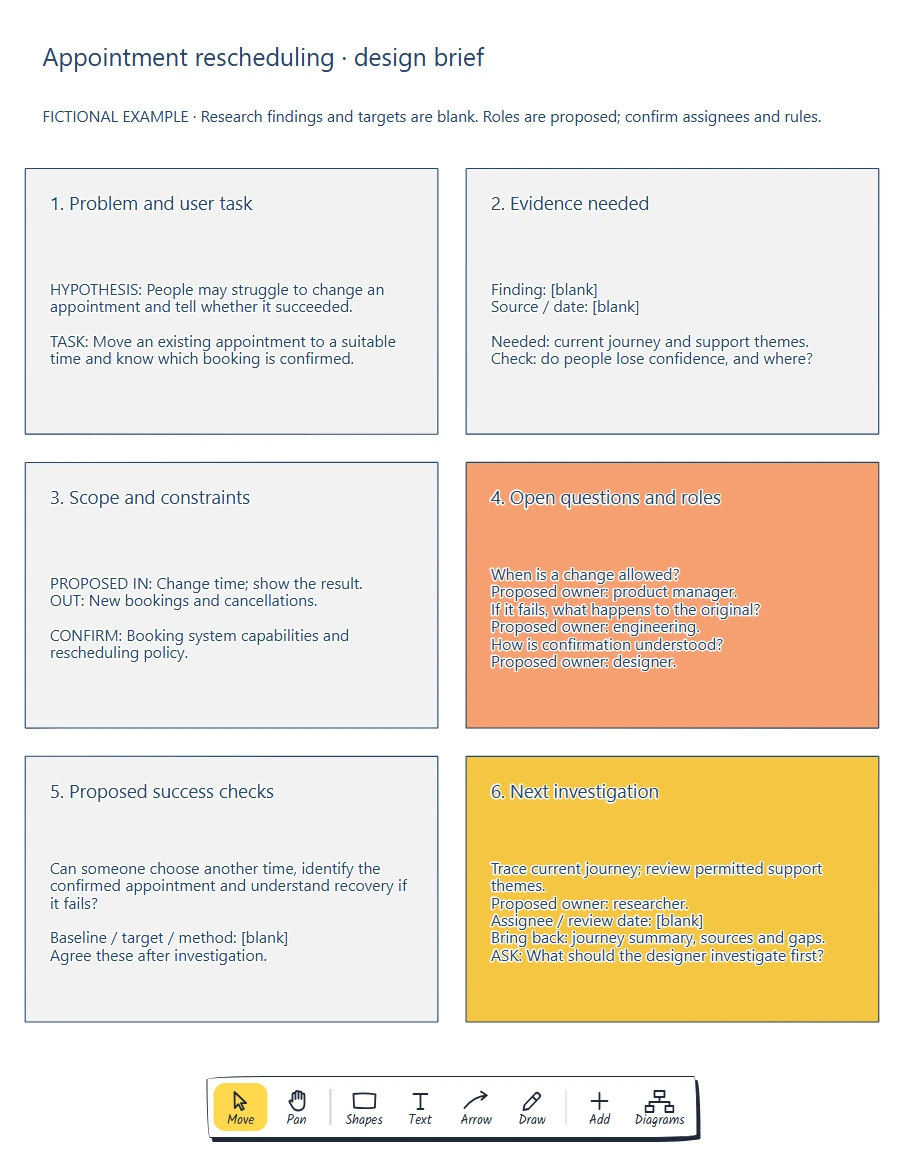
Read the brief across each row. The proposed problem leads to the evidence needed; the boundaries and open questions then shape the checks and first investigation.
Double-click a label to edit it. Replace the example's problem and task before filling the other sections, so each field refers to the same piece of work.
Separate evidence from what you hope to find
With a proposed problem in place, ask what would support or challenge it. Write a short finding with a source and date when you have one. Keep its limits visible: a support request describes that person's experience, while a count of rescheduling attempts needs a defined event and reporting period.
The example's evidence section deliberately starts with blanks:
Finding: [blank]
Source / date: [blank]
Evidence needed: current journey and support themes
Check: do people lose confidence, and where?
Those blanks are useful instructions for the next investigation. They prevent the phrase "users find rescheduling confusing" from becoming an invented research result.
For your project, link to a permitted research summary or aggregate report rather than copying personal appointment details onto a shared board. Explain what the evidence does and does not show. If it only concerns changing a date, keep questions about changing the appointment type separate.
Once evidence arrives, update the problem sentence. If people can find the control but cannot tell whether the change saved, the designer now has a more specific job: investigate confirmation and recovery.
Set the boundary and check the rules
The task and evidence determine what the brief needs to cover. For this example, the proposed scope is changing the time of an existing appointment and showing the result. New bookings and cancellations are excluded from this draft.
Exclusions make review questions easier to answer. Someone can still raise cancellation as a related need, but the team must decide whether to expand the brief before adding that work.
Separate confirmed constraints from rules to investigate. The example marks the booking system's capabilities and the rescheduling policy as unconfirmed. It does not assert that a particular cutoff, fee or slot-holding rule exists.
Write the questions that could change the design:
- When does the service allow a time change? The product manager needs to confirm the policy.
- What happens to the original appointment if the change fails? Engineering needs to verify the booking system's behaviour.
- How does someone know which appointment is confirmed? The designer needs to investigate the current experience.
These are proposed roles in the example. In your brief, replace them with agreed owners. Record the answer and its source when it is known; keep the question open until then.
Choose success checks that follow from the task
The person rescheduling needs a suitable time and a clear result. The brief's proposed checks therefore ask whether someone can choose an alternative, identify the confirmed appointment and understand what to do if the change fails.
Use those as questions for reviewing a prototype. They are not measured findings or agreed launch targets. Keep a separate field for a baseline, target and measurement method, and leave it blank until the team has the information needed to agree them.
For example, a completion measure would need a definition of a successful change and a denominator such as eligible attempts. A count of clicks on "Reschedule" would answer a different question. Decide which question matters before choosing a target.
Atlassian's goals, signals and measures guidance provides a broader way to connect intended outcomes to observations and measures. For this brief, keep the proposed checks close to the user task and make the missing measurement decisions explicit.
Turn the biggest unknown into the next action
The brief now has a problem hypothesis, evidence gaps and rules that affect the design. Choose the uncertainty that should be addressed first.
In the example, the next investigation is to trace the current rescheduling journey and review permitted support themes. The proposed research owner will bring back a short journey summary, source references and gaps. The person and review date remain blank until assigned.
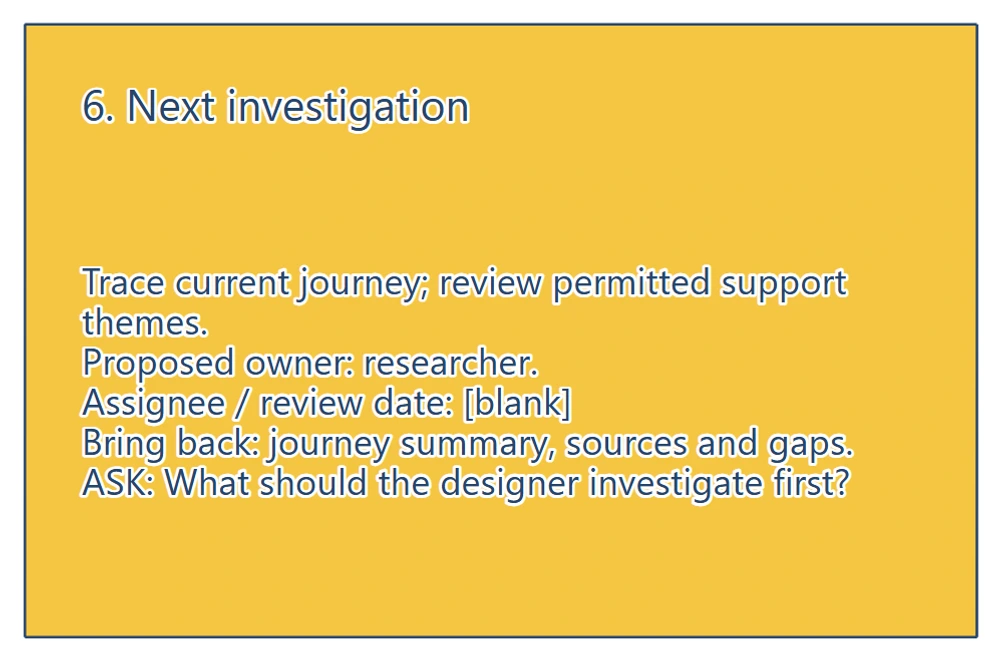
The next action names what to investigate and what to bring back. The blank assignee and review date still need agreement before anyone treats this as assigned work.
Ask a teammate: "What should the designer investigate first?" Then ask them to point to the evidence or open question behind their answer. If they choose a different starting point, discuss which unknown affects the work most.
A completed first draft may lead to research or a policy conversation before sketching. After that work, revise the brief and use it to choose the next design artefact.
When the investigation has clarified the task and rules, use the user flow, wireframe and wireflow comparison to choose the drawing that will answer your next review question.
Review checklist
Use this design brief checklist before handing the page to a designer:
- Can they describe the user task without translating a feature request?
- Does every claimed finding have a source, with assumptions clearly labelled?
- Are scope exclusions and unconfirmed constraints visible?
- Do the open questions have agreed owners, or an explicit assignment gap?
- Do the proposed checks follow from the task?
- Is the next action specific enough to start, with an assignee and review point?
Copy this worksheet into a document or fill the same fields in the editable starter:
Brief title / version / owner:
User and task:
Problem / hypothesis:
Evidence summary / source / date:
Evidence still needed:
Proposed scope / exclusions:
Confirmed constraints / source:
Rules to confirm / owner:
Proposed success checks:
Baseline / target / measurement method:
Next investigation / expected output:
Agreed assignee / review date:
What changed after review:
If the summary no longer fits, move supporting detail into linked notes and keep the decisions on the page. Keep the text readable so a reviewer can use it during the conversation.
Optional: create the brief with an AI assistant
MCP lets a compatible AI assistant use EpicDraw's diagram tools to create an editable planning page. This route needs a free EpicDraw account, cloud sync and a remote MCP assistant with OAuth sign-in.
In EpicDraw, open More, choose Connect AI assistant and add https://epicdraw.app/mcp in your assistant. Approve permission to create and edit diagrams. Follow the MCP connection guide if you need the setup steps.
Paste this prompt into the connected assistant:
Using the connected EpicDraw MCP server, create a new editable page named "One-page design brief". Leave existing pages unchanged.

Create a six-section one-page brief for a fictional appointment rescheduling feature. Label the page fictional. Include: (1) the hypothesis that people may struggle to change an appointment and tell whether it succeeded, and the task of moving an existing appointment to a suitable time and knowing which booking is confirmed; (2) blank finding and source/date fields, with current journey and support themes as evidence needed; (3) proposed scope of changing time and showing the result, excluding new bookings and cancellations, with booking system capabilities and rescheduling policy to confirm; (4) questions about when a change is allowed, what happens to the original if it fails, and how confirmation is understood, with product manager, engineering and designer as proposed owners; (5) proposed checks for choosing another time, identifying the confirmed appointment and understanding recovery, with baseline, target and method blank; (6) a next investigation to trace the current journey and review permitted support themes, with researcher as the proposed owner, assignee/review date blank, and a journey summary, sources and gaps as the expected output. Add "What should the designer investigate first?" as the review question.

Use editable shapes and text. Keep research findings and targets blank. Mark roles as proposed and rules as unconfirmed. This is a visual planning draft. Check for overlapping objects and overflowing labels, then return a PNG preview and the private editor link. Leave the result as a draft for me to review.
Inspect the PNG and open the returned private editor link while signed in. Layouts vary between assistants, so check the labels, blank fields and scope before using the brief. The assistant creates a planning draft; it does not conduct customer research, verify a booking policy or build a working rescheduling service.
Takeaways
- Start with the user's task and label an untested problem as a hypothesis.
- Separate evidence you have from evidence you need.
- Use scope, exclusions and open rules to explain the design boundary.
- Connect success checks to the task and leave unsupported targets blank.
- End with an investigation someone has agreed to own, then update the brief with what you learn.
Keep your next draft close
Create a free account to save your pages in the cloud and use them across devices.
Create a free accountYou can keep drawing without an account.